

Background
Lumos signs webhooks it sends to your endpoints and includes the signature in the “X-Lumos-Webhook-Signature” HTTP header. You can use this signature to verify that Lumos webhooks came from Lumos and not from an unauthorized third party. You can verify Lumos webhook signatures by using the webhook signing secret, the raw request body, and the webhook signature header.Steps
1. Go to the settings page for your webhook.
2. Copy the signing secret.
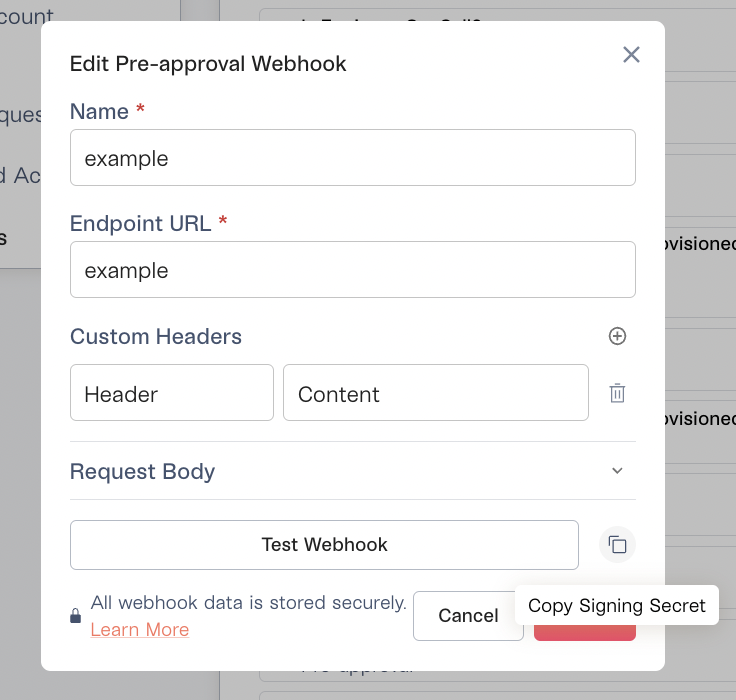
3. Once you have the signing secret, write code that parses X-Lumos-Webhook-Signature and verifies the signature.
More information on the signature format is immediately below.
Signature format
A Lumos webhook signature header looks like this:- A single timestamp (
ts=1648572300000). The unix timestamp set when Lumos dispatches the webhook. - One or more signature parts
sig:v1=fd5355e3f42be2f0820c805df780694ce1ab2a0c236f978983697ff25a25bf
= character:
- A prefix and scheme
sig:v1 - The signature
fd5355e3f42be2f0820c805df780694ce1ab2a0c236f978983697ff25a25bf12
"sig:v" followed by an integer.
That integer is the scheme version. For now it’s just set to 1, but in the future it may be set to something else. The scheme version indicates which verification algorithm should be used to verify the signature.
Verification
Signatures with scheme version 1 can be verified by computing the HMAC-SHA256 of the bytes of the UTF-8 encoded string{timestamp}:{request body} with the signing secret, and then using a constant-time string comparison routine to verify the HMAC-SHA256 with the received signature.
You should verify that a signature with scheme version 1 is in the signature header and that all signatures with scheme version 1 are valid.