

Background
This beta adds reporting metrics directly to the Lumos AppStore table so that you can measure how your AppStore rollout is performing. A full reporting dashboard is in development. These metrics will automatically refresh on a weekly basis. Warning: This is currently limited to customers who have their ITSM (Jira, FreshService, Zendesk, ServiceNow) connected in Lumos. If you’re interested in participating in this beta, contact your CSM.Instructions
- Once you have this enabled for your environment, you should see a banner at the top of the AppStore table denoting your overall median Lumos Time to Resolution and Time to Approval.
- By default, the new metric columns are hidden, but you can add them into your view by clicking on the gear icon at the top right of the table, and selecting the metrics you wish to view.
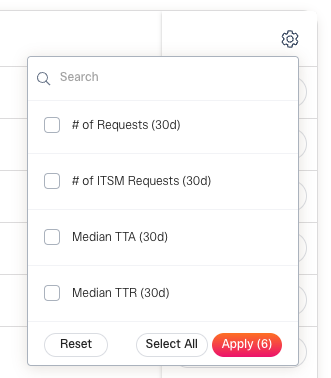
- Sort the columns as needed.
How should I use these metrics?
1. For my most requested apps, am I happy with the Time to Approval (TTA) and Time to Resolution (TTR)?
If you want to improve your TTA, pop open the Settings for that app. You may want to:- Update the approvers on the app if they’re not the right users to approve
- Set up Pre-Approval rules to ensure users get access quickly. SeeSetting Up Pre-Approvals
- Configure your AppStore reminders to ensure approvers review quickly. SeeAppStore Notifications
- Contact the assigned approvers to understand why they take longer than expected.
- Enable SCIM if possible for this application in your identity provider.
- Look into automating this access withProvisioning Webhooks.
- Check and see if there are manual steps required to provision the user, and check with your app admin to understand why it’s taking longer than expected.
2. How does my ITSM TTR compare to my Lumos TTR?
To understand if your new process (Lumos) is performing better than your old process (ITSM), compare these two columns. If Lumos is not performing better than your old process, contact your CSM for help troubleshooting.3. Is your Employee Adoption low?
If your Employee Adoption is low, this means that users may be going to your old process (ex: Jira form) to make requests instead of going into Lumos. To improve this number, update your Jira form to reroute users to Lumos.Glossary
-
TTR - Time to Resolution
- This is the time it takes to resolve the request from creation. In Lumos, this is only calculated when access has been provisioned.
-
TTA - Time to Approval
- This is the time it takes to approve the request in Lumos. If there are multiple approval stages, this is the time it takes to complete the final approval stage.
-
Resolved Request
- In Lumos, this refers to all requests that were successfully provisioned. It does not include cancelled, denied, or expired requests.
Metric Definitions
-
# of Requests (30d)
- Number of resolved access requests in Lumos in the last 30 days.
-
# of ITSM Requests (30d)
- Number of completed access requests in your configured ITSM over the last 30 days. If you have ITSM logging enabled, this will also include Lumos access requests.
-
Median TTA (30d)
- Median time to approval (TTA) for completed Lumos access requests over the last 30 days.
-
Median TTR (30d)
- Median time to resolution (TTR) for completed Lumos access requests over the last 30 days.
-
Median ITSM TTR (30d)
- Median time to resolution (TTR) for completed access requests in your configured ITSM over the last 30 days. If you have logging enabled, this will also include Lumos access requests.
-
Pre-approved Requests
- % of completed access requests in Lumos that were pre-approved over the last 30 days.
-
Auto-provisioned Requests
- % of completed access requests in Lumos that were auto-provisioned over the last 30 days.
-
Employee Adoption
- % of completed access requests that were facilitated through Lumos.
If you have logging enabled, this will be ’# of Requests (30d)’/’# of ITSM Requests (30d)’.
If you do not have logging enabled, this will be ’# of Requests (30d)’/(’# of Requests (30d)’ + ’# of ITSM Requests (30d)’)
- % of completed access requests that were facilitated through Lumos.