

Can I change the Provisioning Group tied to a custom permission?
Situation
I added a custom permission to my AppStore app and I can’t change the Provisioning Group that I set originally. See Adding Custom PermissionsAnswer
You cannot change the Provisioning Group on a permission once you’ve set it. Lumos explicitly forbids this to keep your audit trail clean. Changing this value would change what it means for someone to have been assigned to the permission, so Lumos makes this value uneditable. If you need to update the provisioning group, you need to delete or hide the old permission.How do I add someone to an IdP/email group that’s not tied to an app?
Situation
You need to add people to an IdP or email group, but the group isn’t associated with any app in your AppStore. There are a few different ways you can do this in Lumos.Option I: Custom app and permissions [IdP or email groups]
In Lumos, you can create a custom app, add it to your AppStore, then attach arbitrary groups to that app as requestable permissions. Once requesters are approved for those permissions, they’re added to the group(s) automatically.Steps
1. Create a custom app in Lumos.
See Adding a custom app2. Add the app to the AppStore.
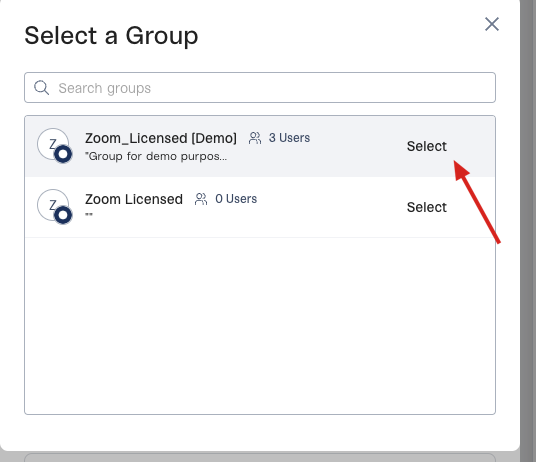
See Adding Apps To Your AppStore3. Create a custom permission for the app and click “+Select” in the Provisioning Group.
See Adding Custom Permissions4. Select the group you want to add the user to, then finish adding the permission.
Advantages
- Quick to set up
- No additional work needed in your IdP or email provider.
- Works for any group, IdP or email provider.
Disadvantages
- If people are removed from the groups they were added to, they’ll still show up in the list of users associated with the app in Lumos. This could cause confusion from a reporting perspective.
- If people are added to the groups outside of Lumos, the custom app will not reflect those new users.
Option II: Create a “bookmark” app and attach the groups to it [IdP only]
Some IdPs allow you to create a “bookmark” app (Okta, for example) and attach groups to it. Using this option, Lumos automatically pulls in the app and associated groups as requestable permissions in the AppStore.1. Create a bookmark app in your IdP.
2. Hide the bookmark app in your IdP.
3. Sync your apps in Lumos.
See How Lumos Syncs Your Integrations4. Add your new app to the AppStore.
The “bookmark” app will not be visible to users in your IdP (if you followed step 2), but will be available as a requestable app in your AppStore. See Adding Apps To Your AppStoreAdvantages
- The Lumos app is always synced with app + group assignments in your IdP.
Disadvantages
- It’s a bit more work to do the bookmark app setup in your IdP
- Only works for IdP apps, cannot use for email provider groups