

The three states
Every access policy is in one of three states at any given time: Draft. The policy exists but is not enforced. It does not apply to any user, onboarding workflow, or mover workflow. Drafts are fully editable, can be deleted at any time, and don’t have to be unique. This is the safe space to design, review, and iterate. Published + Inactive. The policy has been published, but it’s turned off. It won’t apply to future onboardings or mover workflows. Use this state when you want a policy formally reviewed and ready to go, but not yet running. Published + Active. The policy is live. It applies to future onboarding and mover workflows that match its conditions.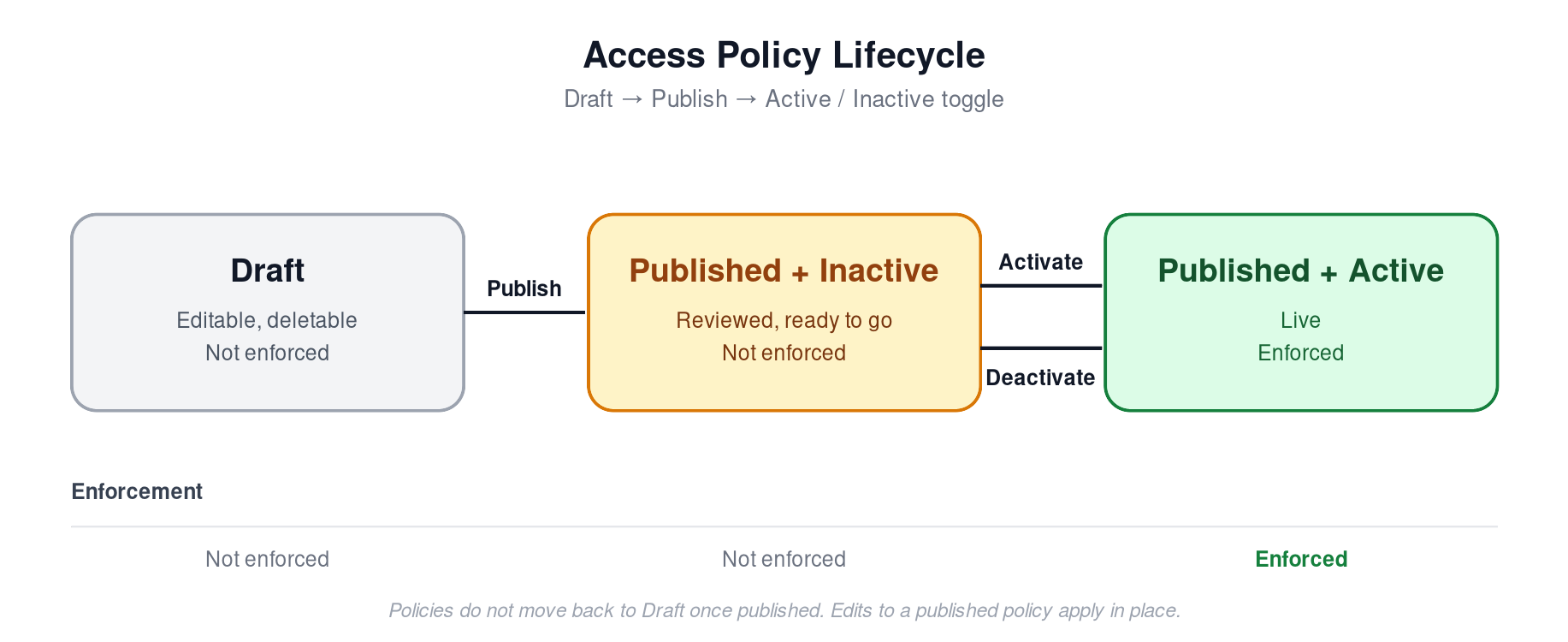
How policies move between states
The full lifecycle is Draft → Publish → Active/Inactive.- A new policy starts as a Draft. Whether you create it manually, through Albus, or through the API, it lands in the Drafts tab of the Access Policies table.
- You publish the draft when it’s ready. Click Publish from the policy detail page or directly from the Drafts tab. On publish, the policy moves to the Published tab.
- You toggle Active or Inactive. Newly published policies default to Inactive. Set them to Active when you’re ready for them to start applying to workflows.
What being active actually means
“Active” means the policy is evaluated as part of onboarding and mover workflows. A policy is only enforced when it is Published + Active. In every other state (Draft, or Published + Inactive), the policy has zero effect on users. This is the key safety property of the lifecycle: nothing you do in the Drafts tab can accidentally grant or revoke access.Overlapping conditions
Uniqueness of conditions is only validated at publish time. That means:- Two drafts can have overlapping conditions with each other.
- A draft can have overlapping conditions with a published policy.
- A draft cannot be published if its conditions overlap with an existing published policy. You’ll need to resolve the overlap first.
Albus and the API
The lifecycle applies regardless of how a policy is created:- Albus-generated policies always land as drafts. Admins explicitly publish and activate them.
- The API creates drafts by default. If you want to skip the draft state and create a published policy programmatically, set the
statusparameter on the request.