

Problem
When running an access review for an app in my IdP (Okta, OneLogin, etc.), there are IdP groups related to this app that aren’t showing up in the Groups column.Solution
Check if the group is assigned to the app in your IdP
In an access review, Lumos only shows IdP groups that are attached to the app. For example, in Okta, you can assign an app to a group. Groups that are attached to an app in this way will appear in the Groupscolumn. If you aren’t seeing the group, the app may not be assigned to the group. Once you’ve assigned the group to the app, follow the instructions below to refresh the data in Lumos.Check that your Okta groups have synced in Lumos.
It may be the case that the group hasn’t synced into Lumos yet. To sync the group assignments for an app, follow the instructions below. 1. Go to your connected integrations. 2. Click on the tile for your IdP. 3. Click the ”…” button, then click “Sync Groups.” 4. Once the sync in step 3 finishes, click “Sync Users”.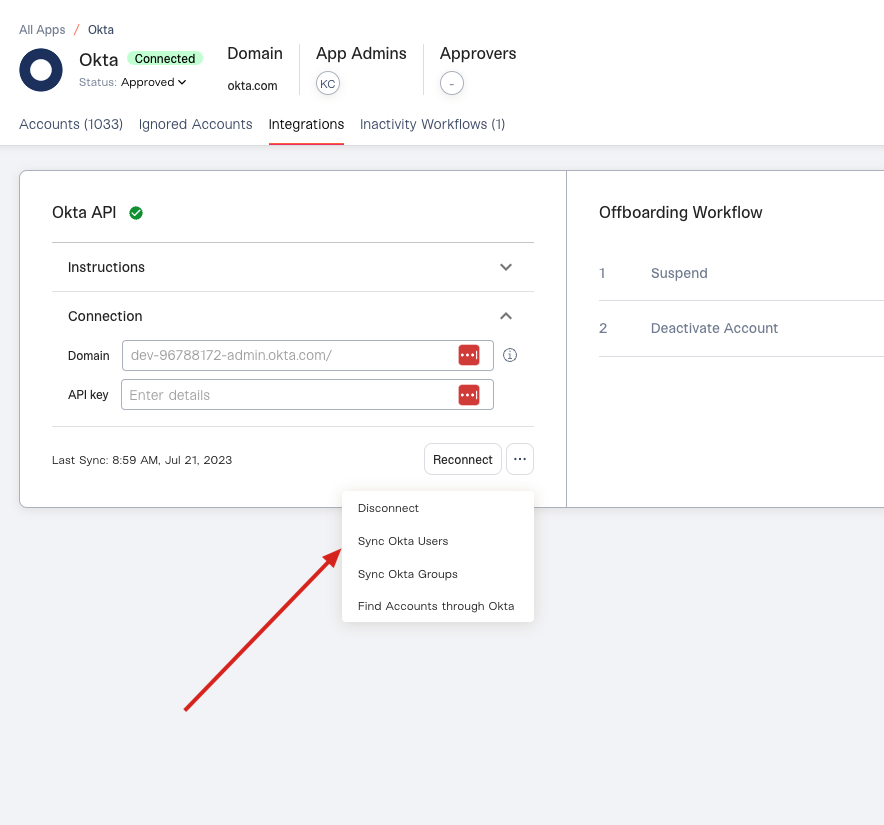
- A link to the app in Lumos
- The name of the IdP group you’re expecting to see.