

Overview
The Lumos MCP server lets your users work with Lumos from inside the AI assistants they already use, such as Claude. Today they can search the AppStore, request access, and check the status of their requests without leaving the assistant. Every action runs through the normal Lumos authentication, permission, and audit pipeline.- It is an OAuth-protected MCP endpoint that AI clients connect to.
- Every call runs as the authenticated user. There is no shared service account and no agent-owned identity.
- Users log in through your IdP, review a consent screen, and grant access to a specific, named set of actions.
- Activity is recorded in your Lumos Activity Log, and forwarded to your SIEM if you use Lumos SIEM export.
Looking for the security model of MCP Governance?This page covers the Lumos MCP servers that your users connect their AI clients to. For what Lumos captures from managed devices when governing the MCP servers your employees’ agents call, see MCP Governance: Security & Privacy.
What Lumos MCP is
Lumos MCP is a remote server that speaks the Model Context Protocol, an open standard for connecting AI assistants to external services, supported by clients such as Claude, Claude Code, Codex, and Gemini CLI. When a user connects their AI client to Lumos, the assistant gains a small, well-defined set of tools it can run on the user’s behalf, after the user logs in and grants consent. Lumos runs two MCP servers behind one shared OAuth authorization server:- User server, live today at
https://api.lumos.com/mcp/user, with tools for searching the AppStore and requesting access. - Admin server, coming soon at
https://api.lumos.com/mcp/admin, with tools for administrative tasks such as configuring the AppStore and managing Access Reviews.
Why it’s safe to approve
- Real identity on every call. The user logs in through your IdP. Audit entries show a real person, not a bot account. There is no shared service account and no standalone agent identity.
- Least privilege by default. A token’s rights are the intersection of the scopes the user consented to and the permissions their Lumos role already grants. An assistant cannot do more through MCP than the user’s role allows.
- Offboarding cuts off access automatically. When you deactivate a user in Lumos, their MCP access stops with them. Calls are denied from the next call on because the account no longer holds the underlying permissions, and any active access token expires within the hour.
- A familiar OAuth posture. This works like any other OAuth-connected enterprise app in your environment. Same login, same consent model, same audit shape, built on published standards. See the technical overview below for the specifics.
What your users see
The first connection
The first time a user asks their assistant to do something in Lumos, the assistant opens a Lumos login page in their browser. The user logs in through your IdP, the same way they log in to Lumos today, and then reviews a consent screen.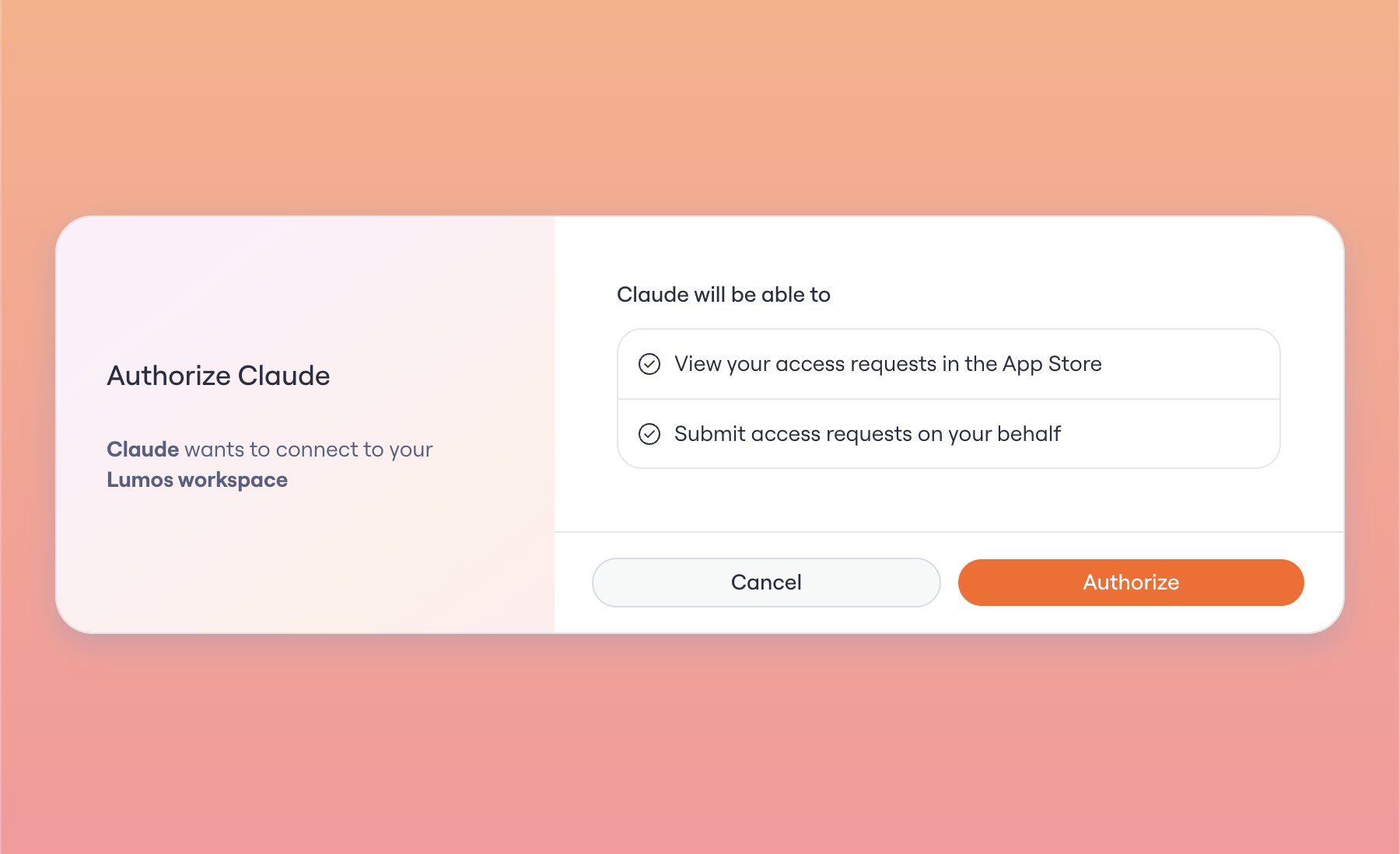
After the first time
The assistant refreshes access in the background, so the user does not log in on every call. They are prompted again only if the client requests a new scope, their access has ended, or the refresh window has expired.How access ends
- Tokens are time-bound. Access tokens last one hour and refresh tokens last up to 30 days, sooner if the connection sits unused. After that, the user logs in again.
- Deactivating a user in Lumos stops their MCP access. Every call is re-checked against the user’s current permissions, so calls are denied from the next call on, and any active access token expires within the hour.
- A user can disconnect Lumos in their AI client at any time. Clients that support OAuth revocation invalidate the token when they disconnect.
Setting up a client
End users connect their own client. For step-by-step setup covering Claude, Claude Code, Codex, Gemini CLI, and other clients, see Connect to the Lumos User MCP Server.Technical overview
For security leads who want to verify the implementation.Protocol and standards
- MCP over HTTPS.
- OAuth 2.1 Authorization Code grant with PKCE (RFC 7636). PKCE is required, and only the S256 challenge method is accepted.
- Authorization Server metadata at
/.well-known/oauth-authorization-server(RFC 8414). - Protected Resource metadata at
/.well-known/oauth-protected-resource/mcp/user(RFC 9728). - Dynamic Client Registration (RFC 7591) and client management (RFC 7592).
- Token revocation (RFC 7009).
- Resource indicators (RFC 8707).
- Loopback and native-app redirects follow RFC 8252.
Endpoints
Login and consent happen on the authorization server (
b.app.lumosidentity.com), the Lumos identity domain. The MCP servers themselves live on api.lumos.com. Allowlist both when you scope network or certificate rules.
Tokens
Lumos stores only SHA-256 hashes of tokens. The raw access and refresh tokens exist only at the moment they are issued to the client. They are never written to the database or to logs.
Refresh tokens rotate on every use, and a rotated token cannot be reused. If a rotated token is replayed after a short grace window of about 30 seconds, which absorbs benign network retries, Lumos treats it as a theft signal and revokes every token in that grant. The legitimate client then logs in again to reconnect.
Resource binding
Each access token is bound to a single MCP resource. A token issued for/mcp/user carries that resource and is checked on every call. A token presented to a different MCP endpoint than the one it was issued for is rejected with a 401. Lumos also validates the resource when the user consents, so a misconfigured client fails at the consent screen instead of minting a token that breaks on its first call.
Authorization
Authorization runs in two layers.- OAuth scopes are the public, client-facing contract. They are coarse on purpose.
- Lumos permissions, derived from the user’s role, are the fine-grained server-side check.
Scopes
Client registration
Lumos supports Dynamic Client Registration so MCP clients can register themselves.- Public clients (native apps and CLIs) authenticate with PKCE alone and receive no secret.
- Confidential clients register with
client_secret_basicand receive a secret that Lumos stores only as a hash.
http address (localhost, 127.0.0.1, ::1) for local development, or a native-app private-use scheme such as claudeai://. Schemes a browser would treat as code execution or local file access (javascript, data, file, and similar) are rejected.
Registration is open, but registering a client grants no access on its own. Before any tool runs, the end user logs in through your IdP and approves a consent screen, the resulting token is bound to one resource, and every call is narrowed to the user’s role permissions. A client that registers but is never authorized by one of your users can do nothing.
The client name shown on the consent screen is self-reported at registration, so users should approve only connections they started themselves and clients they recognize.
Audit
MCP activity flows into your existing Lumos Activity Log. If you forward Lumos activity to a SIEM, MCP activity flows through that same export, with no separate pipeline to configure. Every MCP tool action is recorded as an Activity Log entry, tagged so you can tell it came from an AI agent over MCP rather than from the Lumos web app. An access request submitted through MCP lands in the same access-request trail as one submitted in the UI. It is the same record, just marked with its MCP origin, so there is no separate shadow trail to reconcile. Each entry carries the standard Activity Log fields: the user who acted, your domain, the timestamp, the action, the object it affected, and the outcome. MCP-initiated entries add a provenance block:
Your SIEM receives these provenance fields and the standard entry fields above, and nothing more. The content of a request and the data an agent passes to a tool are not part of the feed.
Never logged
Lumos never logs access tokens, refresh tokens, authorization codes, or client secrets. Only SHA-256 hashes of tokens are stored.What you can monitor
From the logged fields you can track:- MCP adoption: how many requests come through MCP, and from which users.
- Which AI clients and apps are acting on your users’ behalf.
- Success and failure outcomes, broken down by user and domain.