

Theme: Provable Agentic Decision Making
This release adds automation with clearer rationale, stronger guardrails, and more operational visibility, so automated decisions are explainable.Access Reviews
Agentic UARs [GA]
Agentic UARs introduce AI-recommended access review decisions with rich rationale and contextual evidence, reducing repetitive review work and surfacing only the cases that require human judgment. What’s new:- AI Suggests column with Accept / Review / Reject recommendations
- AI Review Insights column with categorized rationale
- Risk spotlighting for privileged, inactive, and anomalous access
- Improved reviewer experience designed to reduce rubber-stamping
- Reduce reviewer completion time
- Increase confidence in access decisions
- Focus attention on high-risk or ambiguous cases
- Strengthen audit defensibility with explainable rationale
Stale Data Guardrails and UX Improvements
Access Review data freshness is now clearly shown. Lumos has added consistent safeguards and clearer UI signals to prevent decisions based on outdated snapshots. What’s new:- Blocking modal when manually launching a review with stale data
- Aggregated stale data warning during bulk launches
- Prominent stale badges in Access Review headers and review tables
- Improved Data Recency column styling and hover details
- Consistent behavior across manual and auto-recurring launches
- Prevent access decisions based on outdated sync data
- Reduce compliance risk from stale last-login signals
- Improve trust in review accuracy
- Provide audit-grade visibility into data freshness
Integrations
New Integrations with Provisioning Actions
New integrations are now available with direct provisioning capabilities, expanding SaaS coverage and supporting pre-IdP workflows. New integrations:- Blackline
- Groove.hq
- UKG Pro
- Delinea Secret Server Cloud
- ADP Workforce Now (Beta - please contact support if you’d like to test)
Existing Connector Improvements
Enhancements across existing integrations continue to deepen flexibility and support real-world use cases. Updates include:- Okta: Create associations from Push Groups to applications
-
Google Workspace Offboarding:
- Remove users from calendar events
- Remove users from all Google Groups
- Transfer Google Drive files
-
PowerShell:
- Run any PowerShell script through Lumos
- Expanded mailbox and group management actions
- Snowflake: Assign default role capability
- Salesforce: Sync Public Groups
Policy Mining
Access Policy Table
A centralized table experience for managing access policies at scale, giving admins structured visibility and bulk management capabilities.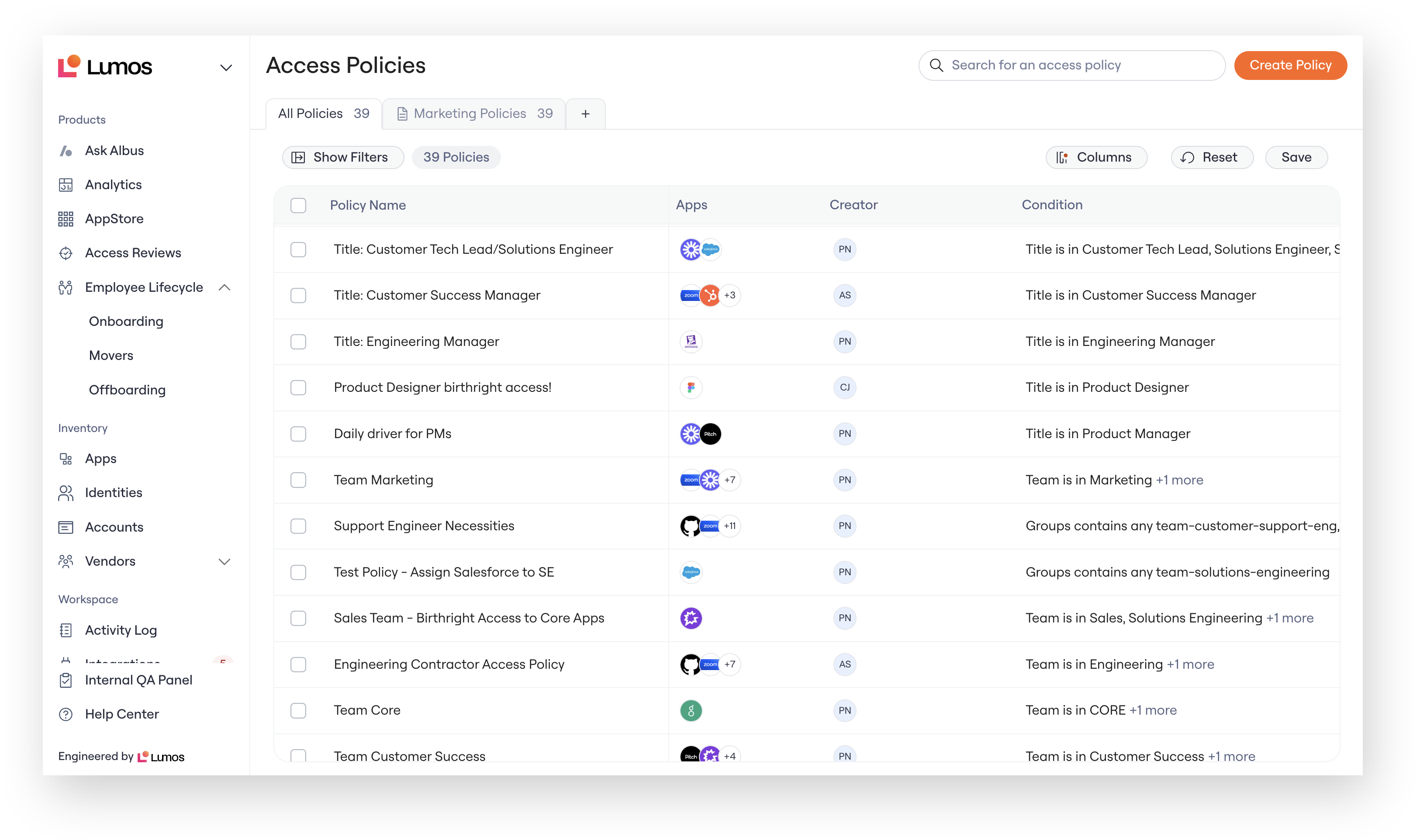
- Full table view of all access policies
- Columns for Policy Name, Apps, Creator, and Condition
- Search and filter capabilities
- Bulk actions for managing policies
- API export support
- Faster policy discovery and management
- Reduced audit preparation time
- Improved visibility across policy owners
- Better governance hygiene at scale
Platform
Notification Repository
A centralized admin hub to discover and manage all email Lumos notifications across product areas.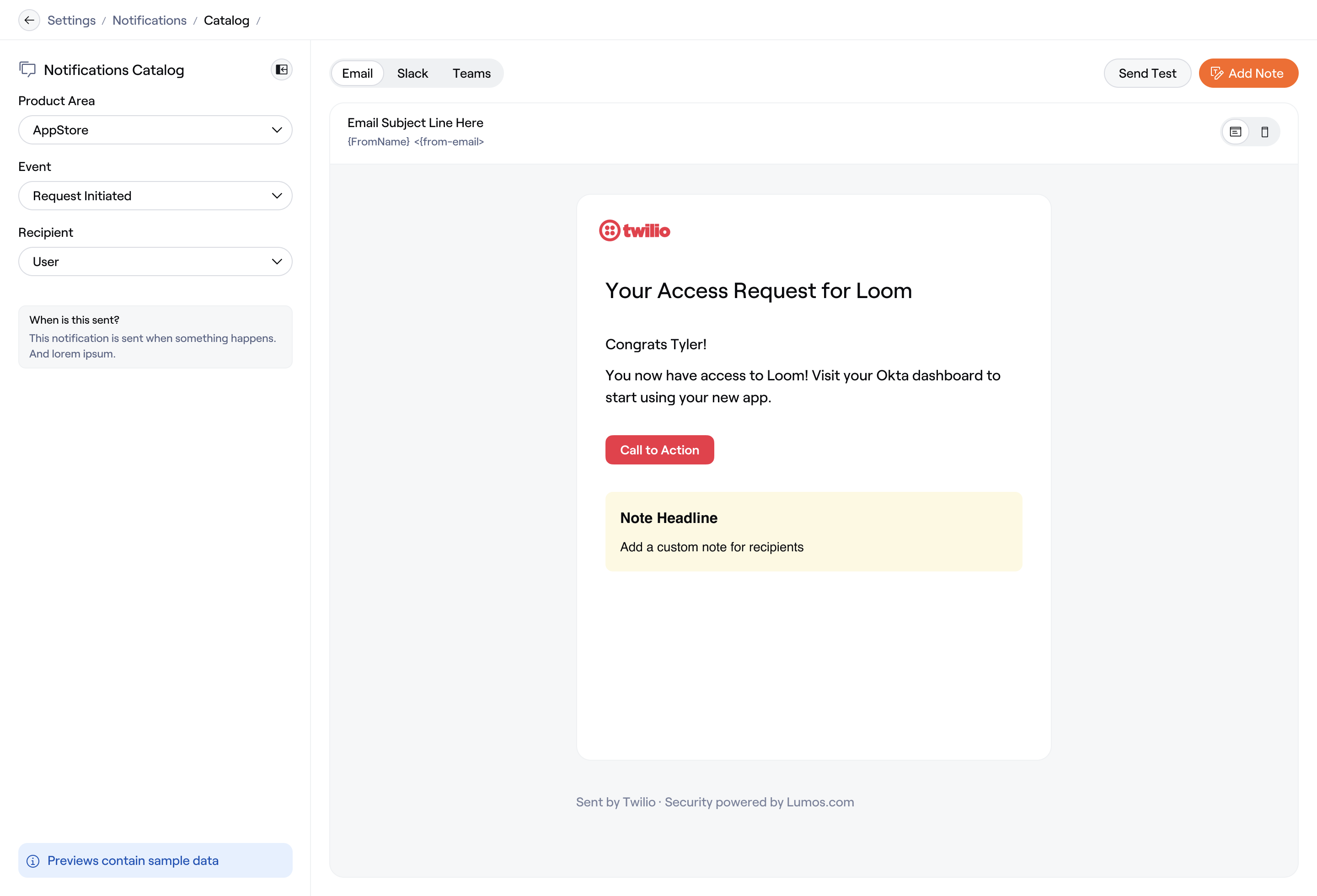
- Single pane of glass for all notification templates
- Metadata including trigger, channel, and status
- Search and filter functionality
- View, edit, or restore notifications to system default
- Clear visibility into what Lumos sends and when
- Faster audit preparation
- Simplified onboarding for new admins
- Foundation for deeper notification customization
Append Message
Admins can now append company-specific messaging to any Lumos notification, consistently across email, Slack, Teams, and ITSM. What’s new:- Add custom Markdown-formatted message blocks
- Support for headers, links, bullet lists, and formatting
- Preview across channels and devices
- Send test notifications before publishing
- Reduce manual follow-up messages
- Meet compliance language requirements
- Deliver consistent, on-brand communication
- Provide clearer next steps to employees
Lifecycle Management
JML Workflow Conditions [BETA]
Onboarding, Offboarding, and Movers workflows can now trigger based on defined employee conditions, enabling safer and more precise automation.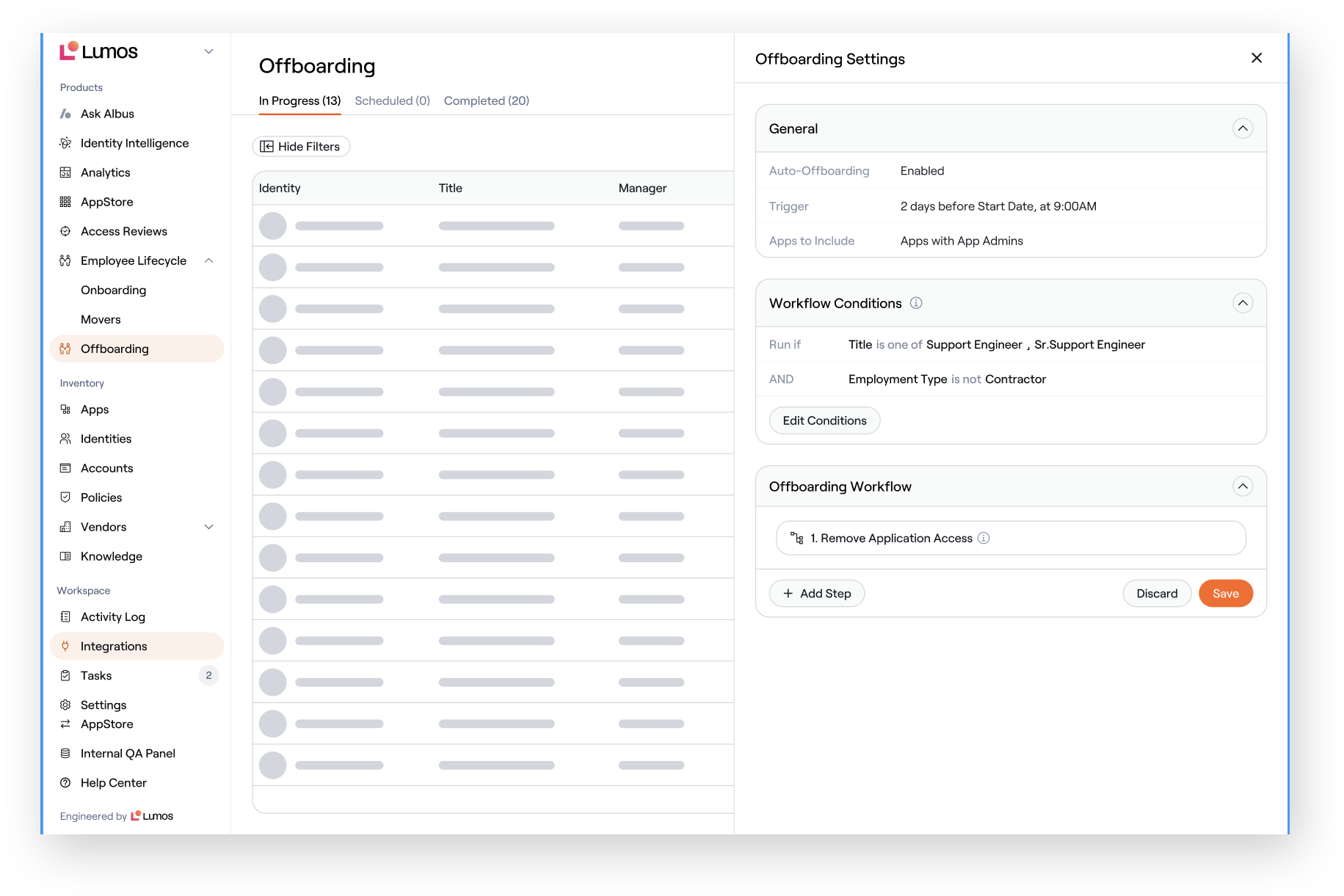
- Conditional logic based on employee attributes
- AND/OR logic support
- Ability to scope workflows to pilot groups
- Applies to new Parent Onboarding and Offboarding workflows
- Automate with precision across FTEs, contractors, and subsidiaries
- Safely pilot lifecycle automation before org-wide rollout
- Reduce incorrect provisioning or offboarding
- Increase confidence in automated lifecycle workflows
Re-Hire Account Reactivation [BETA]
Lumos now intelligently reactivates existing disabled accounts when re-hiring employees, instead of failing provisioning with username conflicts. What’s new:- Automatic detection of “account already exists” errors
- Identity correlation checks for same-person matches
- Auto-reactivation when supported by the integration
- Safety guardrails for different-identity conflicts
- Feature flag control at domain and app level
- Fewer provisioning error tasks
- Faster access for returning employees
- Reduced manual IT work during seasonal peaks
- Improved provisioning success rates
AppStore
JIT Provisioning Support
Lumos now supports Just-in-Time (JIT) provisioning flows for invite-based applications like GitHub, ensuring downstream provisioning completes immediately after account creation. What’s new:- Account Sync API for fast, targeted app sync
- New “Sync Accounts” workflow step
- Support for user acknowledgment before sync
- Optimized sync behavior for large applications
- End-to-end automation for invite-based apps
- Minutes-to-access instead of waiting for scheduled syncs
- Reduced manual intervention for DevOps and IT
- Improved developer onboarding experience
Access Request Workflow Records
A dedicated workflow view for access requests that shows the complete execution path (approvals, provisioning, notifications, and errors) in one place. What’s new:- Visual workflow record per access request
- Step-level status indicators (completed, pending, failed, skipped)
- Detailed timestamps, actors, and error visibility
- Search and filter across workflow records
- Self-serve troubleshooting for stuck requests
- Faster issue resolution without digging through logs
- Improved audit evidence for access approvals
- Clear operational visibility into workflow health