

 Guide to how Lumos Connectors work and how you can build one using the Connector SDK
1. Introduction to Lumos Connectors
Lumos Connectors allow the Lumos platform to manage and automate access across hundreds of different apps. Each connector translates an app’s data model and API into a standard interface that Lumos can consume. From the outside, the process is straightforward:- Describe: The connector tells Lumos what it supports (capabilities), how it authenticates, what types of resources and entitlements it manages, etc.
- Configure: Lumos prompts the customer’s IT admin to provide credentials and any required settings for that specific app instance.
- Use: Lumos calls the connector’s capabilities to read or update data (e.g., list accounts, create user accounts, assign entitlements, etc.).
2. Terminology Overview
- Connector A connector is the code package that allows Lumos to communicate with a third-party app.
- Custom Connector A custom connector is typically built by a customer to manage an internal system or an app not publicly available.
- Capability A capability is a particular standardized action (or API) a connector can perform. Examples include listing user accounts, creating a user account, or assigning entitlements.
- On-premise Connectors When a connector is run on a customer’s own hardware/network, it is referred to as an on-premise (on-prem) connector.
- SDK The SDK is a Python library that provides tools and structures to simplify connector development.
- Account In Lumos, an account refers to a user or service account in the underlying app.
- Entitlement An entitlement is a form of access or permission within the underlying app—such as a role, group membership, or license assignment.
- Resource A resource is an object in the underlying app that can be assigned entitlements (e.g., a project, a team, or a repository). A global entitlement (like an app-wide admin role) has no specific resource context.
3. How Connectors Fit into the Lumos Platform
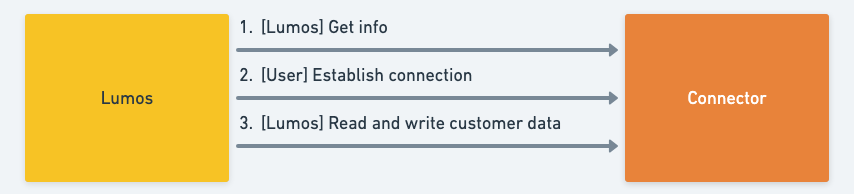
-
Connector Discovery
- Lumos can discover your connector by referencing its name or listing all connectors available on the local or on-prem environment.
- The connector’s
infocapability describes its capabilities, how to authenticate, and what resource/entitlement types it can manage.
-
Customer Configuration
- Using the schemas provided by the connector (for both auth and additional settings), Lumos renders a configuration form.
- The customer IT admin fills in the required credentials (e.g., OAuth tokens, API keys, or Basic auth credentials) and chooses any optional settings.
-
Validation
- Lumos calls the connector’s
validate_credentialscapability to ensure the provided credentials and configuration are valid.
- Lumos calls the connector’s
-
Ongoing Operations
- Whenever Lumos needs to list, read, create, or update resources/accounts/entitlements, it calls the appropriate connector capability.
- For OAuth-based connectors, Lumos might also call capabilities to refresh tokens (
refresh_access_token) or handle authorization flows.
Two Ways to Host Connectors
- Lumos-Hosted The connector code is loaded by Lumos directly as a Python module in a managed environment.
- On-Premise (Customer-Hosted) The connector is packaged to run on a server within the customer’s network. Lumos interacts with it via CLI calls. Often used for apps behind firewalls or not accessible over the public internet.
4. Connector Self-Description (info Capability)
Every connector exposes a special info capability to help Lumos learn how to interact with it. When Lumos calls info, the connector responds with:
- App Metadata A human-friendly name, logo URL, description, and a unique app ID.
- Authentication Schema A JSON schema describing how users can authenticate (Basic, Token, OAuth, etc.).
- Request Settings Schema A JSON schema for non-sensitive configuration fields (e.g., hostnames, toggles, or optional flags).
- Capabilities Which standardized actions (list, create, deactivate, etc.) the connector supports.
- Resource and Entitlement Types What resources and types of entitlements the connector can manage (e.g., “teams,” “groups,” “roles,” “licenses”).
5. Connector Configuration: Auth and Settings
After Lumos sees your connector’sinfo, it knows what credentials are needed (auth) and which optional configuration settings it can ask for.
Auth
Depending on the connector’sauthentication_schema, the user might provide:
- Basic (username + password)
- Token (API key, bearer token, etc.)
- OAuth (access token, refresh token, client credentials, etc.)
get_authorization_url, handle_authorization_callback, and refresh_access_token to manage token exchange and refreshing.
Settings
Connectors can define arequest_settings_schema for additional (usually non-sensitive) settings. Examples:
- A custom domain or hostname to call the underlying app.
- A toggle for including certain data in responses.
- Default roles or groups to manage.
Validating Credentials
After the user provides credentials and settings, Lumos callsvalidate_credentials to check everything is valid. This is often the final step in completing the configuration of a connector.
6. Connector Capabilities
Connectors implement capabilities—standard actions that Lumos can invoke. Each capability has a standardized request/response format, including:auth: Auth credentials.settings: Non-auth configuration data.request: Capability-specific parameters.response: The result data.page: A pagination token if you need to return more data in subsequent calls.
6.1 Metadata Capabilities
-
list_connector_app_idsLists all connector app IDs available. -
info(Described above) Gives Lumos the connector’s metadata and capabilities. -
list_custom_attributes_schemaReturns the schema for any custom attributes the connector supports.
6.2 OAuth Capabilities
-
get_authorization_urlReturns the URL to initiate an OAuth flow. -
handle_authorization_callbackExchanges authorization codes for tokens. -
handle_client_credentials_requestHandles the OAuth client_credentials (machine-to-machine) flow. -
refresh_access_tokenRefreshes an OAuth token using a refresh token.
6.3 Read Capabilities
-
list_accountsList user/service accounts in the app. -
list_entitlementsList available entitlements (groups, roles, licenses, etc.). -
list_resourcesList resources (projects, teams, repositories, etc.). -
list_expensesRetrieve a list of reimbursements and/or card transactions -
find_entitlement_associationsShow which entitlements go with which resources. -
get_last_activityProvide last activity data (e.g., last login) for specified accounts. -
validate_credentialsConfirm credentials are valid, often used right after configuration.
Pagination
Read capabilities (likelist_accounts, list_entitlements) may involve large data sets. They accept/return a page object containing a token. If Lumos sees a token in the response, it can send another request to continue fetching the next “page” of results.
6.4 Write Capabilities
-
create_accountProvision a new user in the underlying app. -
update_accountUpdate an existing user account in the underlying app. -
activate_accountActivate or reactivate a user account. -
deactivate_accountDeactivate/suspend a user account. -
delete_accountPermanently remove a user account. -
assign_entitlementGrant a user an entitlement. -
unassign_entitlementRevoke an entitlement from a user.
7. Deploying Lumos Connectors
There are two ways to deploy connectors: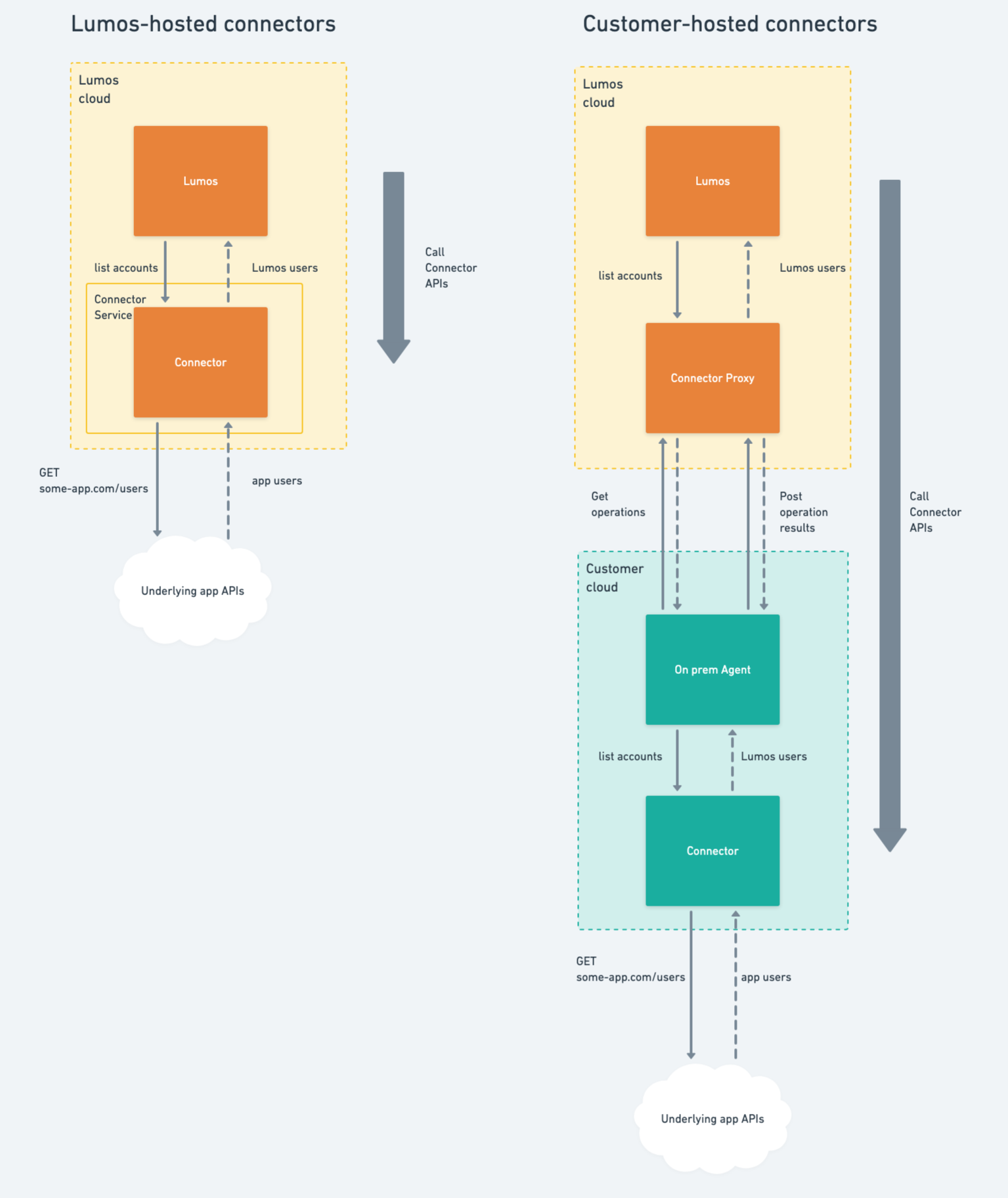
-
Lumos-Hosted
- The connector is installed into a Python environment within Lumos.
- Lumos imports and calls the connector’s functions directly in Python:
-
On-Premise (Customer-Hosted)
- The connector is packaged and installed on servers within the customer’s network.
- Lumos interacts via CLI commands:
- Helpful when the underlying app is not accessible publicly or must remain on a private network.
How to Run an On-Prem Agent Locally
Check the On-Premise Agent documentation for details on installing and running the on-prem agent on Windows or Linux.8. Building Your Own Connector with the Lumos Python SDK
Below is a simplified process for creating a custom connector using the Python SDK:- Install the SDK
-
Define Connector Info
- Implement an info function (or use an SDK-provided structure) to specify the connector’s name, description, app ID, logo, capabilities, authentication, and settings schema.
-
Implement Capabilities
- For each capability (e.g., list_accounts, create_account), write the function that handles the request and returns a response in the standardized format.
- If using OAuth, implement additional capabilities like get_authorization_url, handle_authorization_callback, etc.
-
Test Locally
- Test your connector by calling it locally, either via CLI or direct Python calls, to ensure it can connect to your app’s APIs and handle edge cases.
-
Debugging
- By default, the connector will log to a file in the directory
{cwd}/logswith a default log level ofERRORin a file named{app_id}_{yyyy-MM-dd}.log - You can change the log level by setting the
LUMOS_LOG_LEVELenvironment variable withexport LUMOS_LOG_LEVEL=DEBUG- Valid log levels are
DEBUG,INFO,WARNING,ERROR, andCRITICAL.
- Valid log levels are
- You can also change the directory of the log file by setting the
LUMOS_LOG_DIRECTORYenvironment variable with exportLUMOS_LOG_DIRECTORY=./some_directory- When this is set, the connector will log to a file in the file
{LUMOS_LOG_DIRECTORY}/{app_id}_{yyyy-MM-dd}.log
- When this is set, the connector will log to a file in the file
- By default, the connector will log to a file in the directory
-
Publish and Deploy
- If Lumos hosts your connector, provide the code/package reference.
- If you need on-prem, bundle the connector with the Lumos on-prem agent.
9. Putting It All Together
-
Discovery
- Lumos detects your connector and calls info.
-
Configuration
- Lumos displays a form for an IT admin to enter auth credentials and settings, derived from your inforesponse.
-
Validation
- validate_credentials confirms everything is correct.
-
Use Cases
- list_accounts to view user accounts in the app.
- create_account to provision a new user.
- assign_entitlement to grant permissions or licenses.
- get_last_activity for usage info.
-
Maintenance
- Automatic OAuth token refresh via refresh_access_token.
- Update connector settings or credentials as needed.
10. Next Steps and References
- Lumos Connector Capabilities Detailed specs for each capability’s request/response fields.
- On-Premise Agent Instructions for installing and managing the on-prem agent on Windows or Linux.
- SDK on PyPI connector-py for the latest release and installation instructions.
- Custom Attributes If your app uses custom fields on accounts, see list_custom_attributes_schema.
Final Thoughts
Lumos Connectors standardize how different apps are integrated for consistent user and access management. Whether you build a connector for an internal application or a unique SaaS product, the path is similar:- Describe (capabilities, authentication, schemas)
- Configure (credentials, settings)
- Use (read and write actions on users, entitlements, resources)