> ## Documentation Index
> Fetch the complete documentation index at: https://docs.lumos.com/llms.txt
> Use this file to discover all available pages before exploring further.
# Understanding Webhook Task Failures in Lumos
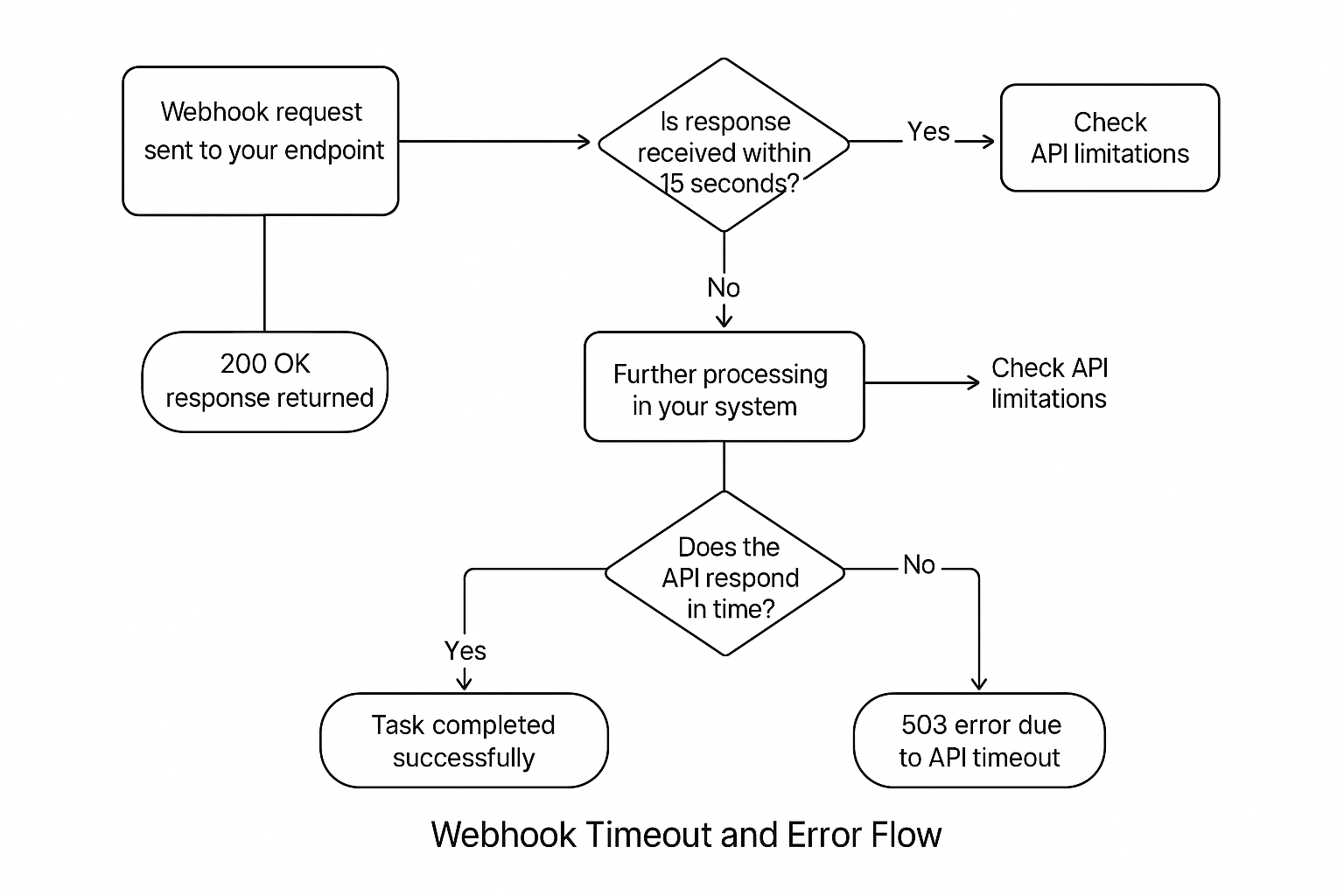
In some cases, your webhook tasks might show as **failed in the Lumos activity log**, even though your internal system handled the request successfully. This behavior is typically caused by:
* **Timeouts in the Lumos webhook system before your system finishes processing.**
* **External service/API timeouts (e.g., AWS API Gateway limits) after Lumos stops waiting for a response.**
 ***
### **Common Scenarios and Root Causes**
#### Scenario 1: Lumos marks the webhook as failed due to **15-second timeout**, but your system completed successfully later
**Symptoms**:
* Lumos shows a task as failed (`timeout` error).
* Customer confirms the task was processed successfully.
* Lumos logs stop listening after **15 seconds**, causing a disconnect.
**Root cause**:\
Lumos, by default, stops waiting after 15 seconds. If your endpoint takes longer to respond (even if it eventually returns `200` or `204`), Lumos will mark it as failed.
#### Scenario 2: Upstream API (e.g., AWS API Gateway) times out after 30 seconds, returning `503`
**Symptoms**:
* Lumos no longer shows a timeout (after timeout extended to **60 seconds**).
* Logs from your side show `503` errors after \~30 seconds.
* Occurs when your system is calling APIs with their own short timeout windows (like AWS API Gateway’s default **30-second limit**).
**Root cause**:\
AWS API Gateway (and similar services) have hard-coded timeouts. Your webhook may be waiting on these APIs beyond their timeout limits, causing them to return `503` errors, which propagate back to your webhook.
***
### **Best Practices to Avoid Webhook Failures and Noise**
#### Always acknowledge Lumos quickly
* Return a `200 OK` response with the following **JSON payload within 15 seconds**:
```
{ "response": "SUCCESS", "msg": "Lumos deprovisioning successful."}
```
* If your actual deprovisioning process takes longer, handle it **asynchronously** and return immediately to Lumos.
#### Check for upstream API limitations
* If calling APIs like AWS API Gateway:
* Validate the **timeout limits (commonly 30 seconds)**.
* Consider raising the API Gateway timeout (if possible).
* Prefer **asynchronous processing** to avoid hitting hard timeouts.
#### Use retries cautiously
* Lumos does not currently retry automatically after a failure marked as a timeout.
* You may implement retry logic within your webhook handler for robustness.
#### Review logs and monitor
* Use tools like Datadog to correlate Lumos execution timeouts with your internal success logs.
* Proactively monitor for patterns of `503` errors from APIs.
***
### **Advanced Troubleshooting Steps**
| | |
| - | - |
| Step | Action |
| Review Lumos logs | Check for exact timeout timestamps and responses. |
| Inspect your endpoint logs | Confirm when the response was actually sent. |
| Cross-check external APIs | Validate if you're hitting API Gateway or similar limits. |
| Simulate with curl/Postman | Time your responses under load to reproduce the timeout behavior. |
***
### 5. **Need More Help?**
**Lumos is working to improve error task messaging and timeout handling. Reach out to** [**support@lumos.com**](mailto:support@lumos.com) **in the meantime as needed.**
***
### **Common Scenarios and Root Causes**
#### Scenario 1: Lumos marks the webhook as failed due to **15-second timeout**, but your system completed successfully later
**Symptoms**:
* Lumos shows a task as failed (`timeout` error).
* Customer confirms the task was processed successfully.
* Lumos logs stop listening after **15 seconds**, causing a disconnect.
**Root cause**:\
Lumos, by default, stops waiting after 15 seconds. If your endpoint takes longer to respond (even if it eventually returns `200` or `204`), Lumos will mark it as failed.
#### Scenario 2: Upstream API (e.g., AWS API Gateway) times out after 30 seconds, returning `503`
**Symptoms**:
* Lumos no longer shows a timeout (after timeout extended to **60 seconds**).
* Logs from your side show `503` errors after \~30 seconds.
* Occurs when your system is calling APIs with their own short timeout windows (like AWS API Gateway’s default **30-second limit**).
**Root cause**:\
AWS API Gateway (and similar services) have hard-coded timeouts. Your webhook may be waiting on these APIs beyond their timeout limits, causing them to return `503` errors, which propagate back to your webhook.
***
### **Best Practices to Avoid Webhook Failures and Noise**
#### Always acknowledge Lumos quickly
* Return a `200 OK` response with the following **JSON payload within 15 seconds**:
```
{ "response": "SUCCESS", "msg": "Lumos deprovisioning successful."}
```
* If your actual deprovisioning process takes longer, handle it **asynchronously** and return immediately to Lumos.
#### Check for upstream API limitations
* If calling APIs like AWS API Gateway:
* Validate the **timeout limits (commonly 30 seconds)**.
* Consider raising the API Gateway timeout (if possible).
* Prefer **asynchronous processing** to avoid hitting hard timeouts.
#### Use retries cautiously
* Lumos does not currently retry automatically after a failure marked as a timeout.
* You may implement retry logic within your webhook handler for robustness.
#### Review logs and monitor
* Use tools like Datadog to correlate Lumos execution timeouts with your internal success logs.
* Proactively monitor for patterns of `503` errors from APIs.
***
### **Advanced Troubleshooting Steps**
| | |
| - | - |
| Step | Action |
| Review Lumos logs | Check for exact timeout timestamps and responses. |
| Inspect your endpoint logs | Confirm when the response was actually sent. |
| Cross-check external APIs | Validate if you're hitting API Gateway or similar limits. |
| Simulate with curl/Postman | Time your responses under load to reproduce the timeout behavior. |
***
### 5. **Need More Help?**
**Lumos is working to improve error task messaging and timeout handling. Reach out to** [**support@lumos.com**](mailto:support@lumos.com) **in the meantime as needed.**