> ## Documentation Index
> Fetch the complete documentation index at: https://docs.lumos.com/llms.txt
> Use this file to discover all available pages before exploring further.
# Identity Agent Force Overview
## What is Identity Agent Force
Identity Agent Force is a set of AI security agents that analyze your connected environments and surface the highest-risk identity issues as actionable Issues in Lumos. The agents focus on non-human identities (service principals, IAM roles, and machine credentials) and other risks that point-in-time access reviews tend to miss. Each agent specializes in one environment and produces a small set of high-confidence findings rather than flagging everything.
## Getting started
1. Connect the relevant integration. For Microsoft Entra ID, see [Connecting Microsoft Entra ID (NHI)](/integrations/library/non-human/entra-id-nhi). For AWS, see [Connecting to AWS IAM Identity Center (NHI)](/integrations/library/non-human/aws-iam-nhi).
2. Create the agent for that environment and confirm it is connected (see Creating an agent above).
3. Open the **Identity Agent Force** page to review findings.
4. Open each Issue, review the remediation workflow the agent proposes, and launch it. The Issue completes when the workflow finishes.
## Why it works differently: compound risk
Most scanners flag single signals, such as "this app has too many permissions." In practice, most broad permissions are intentional, so single-signal alerts create noise and train teams to ignore reports. Identity Agent Force looks for compound risk instead: the combination of privilege, credential mismanagement, ownership gaps, and dormancy that together create an exploitable vulnerability.
| Approach | What it flags | Signal quality |
| - | - | - |
| Single-signal scanning | "This app has too many permissions" | Low: most are intentional |
| Compound risk analysis | "This unowned, dormant app has admin permissions, century-long credentials, and zero conditional access coverage" | High: this combination is exploitable |
Non-human identities do not go through periodic access reviews, do not trigger offboarding workflows, and do not respond to MFA challenges. When one is compromised, the blast radius can span an entire directory or AWS Organization. Identity Agent Force analyzes them through this compound-risk lens and surfaces only the combinations that create real, exploitable vulnerabilities.
## The agents
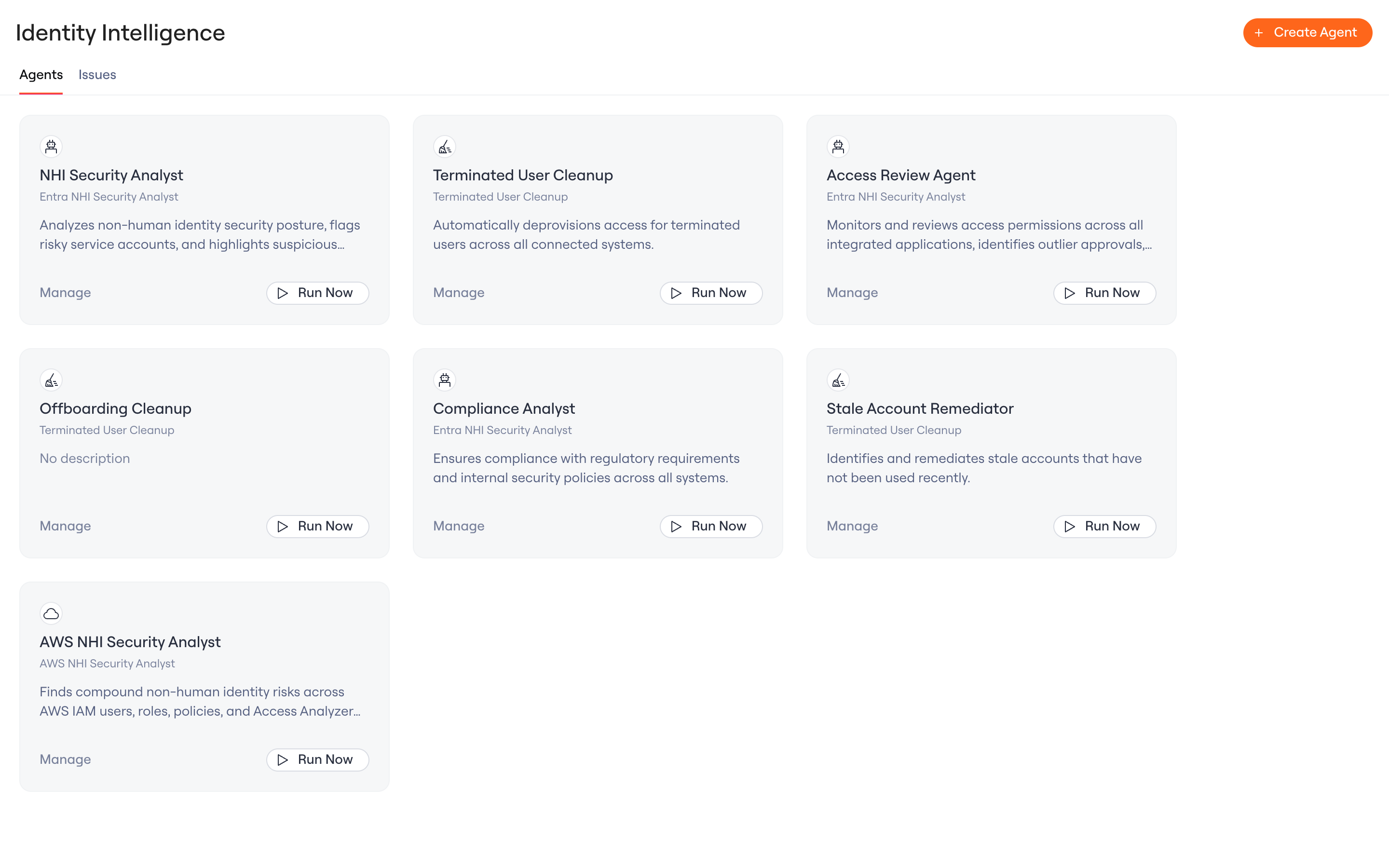
Identity Agent Force includes these agents. Each one has its own page with setup steps and the findings it surfaces.
| Agent | What it does |
| - | - |
| [AWS NHI Threat Hunter Agent](/kb/identity-intelligence/agents/aws-nhi-threat-hunter-agent) | Analyzes the AWS IAM authorization graph, federation (OIDC and SAML), GuardDuty findings, and IAM Access Analyzer findings to surface exploitable machine-identity exposures. |
| [Entra NHI Security Analyst Agent](/kb/identity-intelligence/agents/entra-nhi-security-analyst-agent) | Analyzes service principals and app registrations in Microsoft Entra ID for dangerous permissions, stale long-lived credentials, and risky configurations. |
| [GitHub NHI Threat Hunter Agent](/kb/identity-intelligence/agents/github-nhi-threat-hunter-agent) | Examines the non-human identities in your GitHub organization (GitHub Apps, OAuth apps, personal access tokens, deploy keys, machine users, and self-hosted runners) and surfaces exploitable combinations of risk. In beta. |
| [Terminated User Agent](/kb/identity-intelligence/agents/terminated-user-agent) | Identifies and helps deprovision access that is still active for terminated users across connected systems. |
 ## Creating an agent
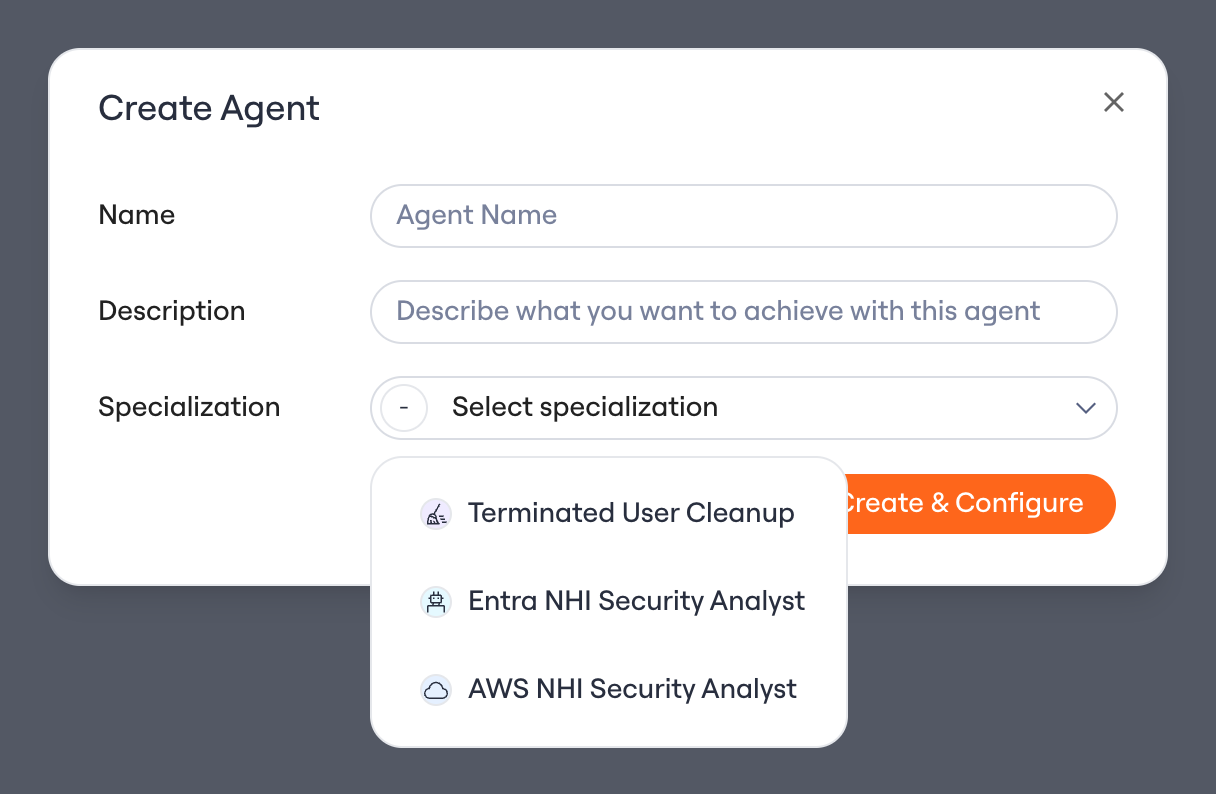
1. On the Identity Agent Force page, open the **Agents** tab and select **Create Agent**.
2. Give the agent a name, then choose a **specialization** (for example, AWS NHI Security Analyst).
3. Add an optional description, then select **Create & Configure** to open the agent and connect its environment.
## Creating an agent
1. On the Identity Agent Force page, open the **Agents** tab and select **Create Agent**.
2. Give the agent a name, then choose a **specialization** (for example, AWS NHI Security Analyst).
3. Add an optional description, then select **Create & Configure** to open the agent and connect its environment.
 ## How issues work
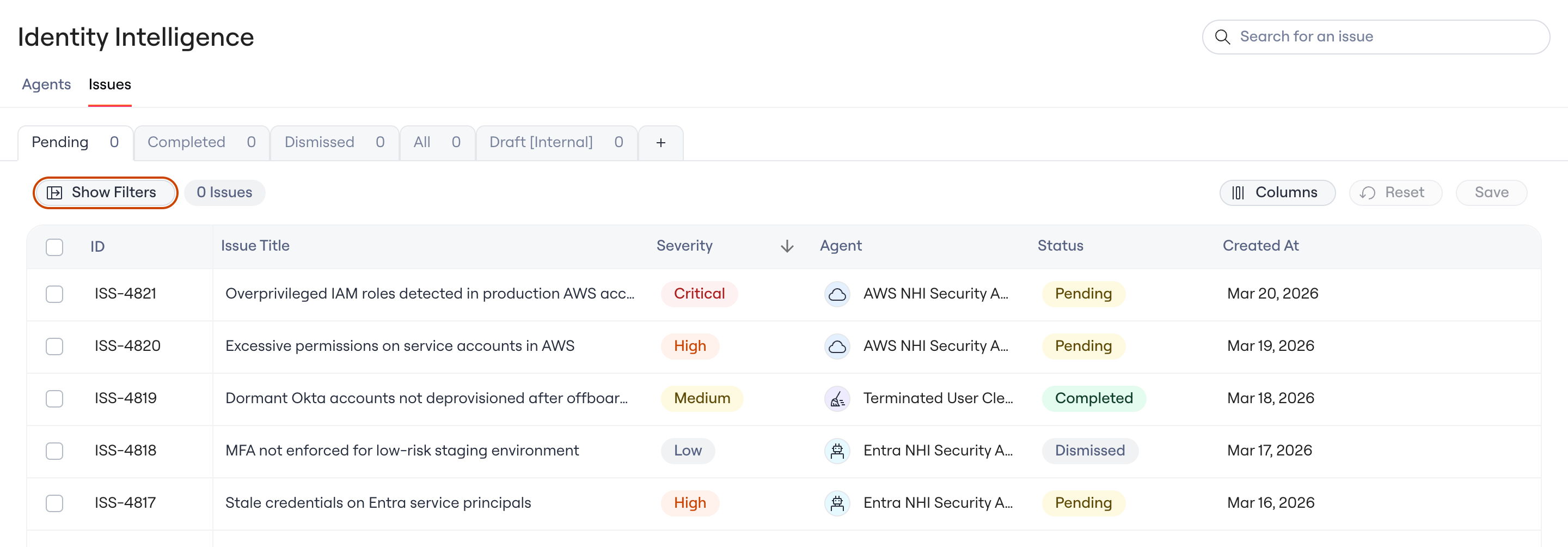
Each agent runs continuously and surfaces findings as Issues on the Identity Agent Force page. An issue identifies a specific identity, explains the combination of factors that makes it dangerous, and includes the evidence and queries your team can use to validate it independently. Findings that fail verification are dismissed automatically and never reach your team.
## How issues work
Each agent runs continuously and surfaces findings as Issues on the Identity Agent Force page. An issue identifies a specific identity, explains the combination of factors that makes it dangerous, and includes the evidence and queries your team can use to validate it independently. Findings that fail verification are dismissed automatically and never reach your team.
 ## Remediating an issue
Each Issue comes with a remediation workflow the agent builds for it. You review it, edit it if needed, and launch it. Nothing runs until you do.
* **Assign the fix to an owner.** A manual task goes to the right person or group in the Task Center, and the Issue waits until it is done.
* **Notify the people involved.** The workflow can send a message to the people who need to know.
* **Require an approval first.** Add an approval step before any change runs.
* **Remove access through the app's connector.** For an Issue tied to an account in a connected app, the workflow can use that app's removal steps.
* **Fix each affected app separately.** An Issue that spans several apps splits into sub-issues, and each one runs its own workflow.
To change the plan, edit the steps on the Issue. Edits apply to that Issue only and do not change your app's shared workflows. To resolve an Issue outside Lumos, choose **Handle it manually**.
## Coverage: OWASP Non-Human Identity Top 10
Identity Agent Force maps its findings to the OWASP Non-Human Identity Top 10. Coverage varies by agent and environment.
| # | Risk category | Entra ID | Amazon Web Services |
| - | - | - | - |
| 1 | Improper offboarding | Ownerless NHIs, stale service principals, abandoned applications | Zero-usage IAM roles, abandoned IAM users with long-unused passwords or access keys, service-linked-role trust drift |
| 2 | Secret leakage | Credential lifetimes, rotation patterns, provisioning defaults | Externally-shared Secrets Manager secrets, externally-shared S3/KMS/Lambda, cross-account trust scoped to root |
| 3 | Third-party risk | Vendor vs. internal ownership, multi-tenant configuration | Cross-account AssumeRole trust outside the AWS Organization, OIDC identity-provider configurations |
| 4 | Insecure authentication | Credential validity, multi-tenant exposure, assignment requirements | SAML signing certificate validity, OIDC weak sub / aud conditions, root-principal trust policies |
| 5 | Overprivileged access | Directory roles and Graph permissions mapped to NHIs | Admin-class policy detection across inline and managed policies, permissions-boundary bypass, hidden inline-admin policies, unconstrained iam:PassRole and sts:AssumeRole |
| 6 | Insecure cloud configuration | Audience settings, disabled-but-privileged identities, credential sprawl | Wildcard-principal trust policies, publicly-invokable Lambda Function URLs, service-linked-role trust drift |
| 7 | Long-lived secrets | Credentials exceeding best practices, century-long defaults | Expired or soon-expiring SAML signing certificates, long-unused IAM user access keys, long-unused IAM roles |
| 8 | Environment isolation | Multi-tenant internal applications with production permissions | Admin-class IAM roles with cross-account trust to principals outside the AWS Organization |
| 9 | NHI reuse | Shared service principals with overlapping permission grants | Shared admin-class roles trusted by multiple cross-account principals, where one compromise propagates across trust chains |
| 10 | Human use of NHI | OAuth2 delegated grants with AllPrincipals admin consent | OIDC trust policies with wildcarded sub claims, where any workload the identity provider can issue a token for can assume the role |
## Limitations
* Agents analyze connected environments only.
* Some signals depend on what the connector can read. For AWS, activity is based on role last-used data.
* Analysis is read-only. Agents never change resources in your environment on their own. Changes happen only through a remediation workflow an admin launches.
Questions? Contact your Lumos account team or open a support ticket.
## Remediating an issue
Each Issue comes with a remediation workflow the agent builds for it. You review it, edit it if needed, and launch it. Nothing runs until you do.
* **Assign the fix to an owner.** A manual task goes to the right person or group in the Task Center, and the Issue waits until it is done.
* **Notify the people involved.** The workflow can send a message to the people who need to know.
* **Require an approval first.** Add an approval step before any change runs.
* **Remove access through the app's connector.** For an Issue tied to an account in a connected app, the workflow can use that app's removal steps.
* **Fix each affected app separately.** An Issue that spans several apps splits into sub-issues, and each one runs its own workflow.
To change the plan, edit the steps on the Issue. Edits apply to that Issue only and do not change your app's shared workflows. To resolve an Issue outside Lumos, choose **Handle it manually**.
## Coverage: OWASP Non-Human Identity Top 10
Identity Agent Force maps its findings to the OWASP Non-Human Identity Top 10. Coverage varies by agent and environment.
| # | Risk category | Entra ID | Amazon Web Services |
| - | - | - | - |
| 1 | Improper offboarding | Ownerless NHIs, stale service principals, abandoned applications | Zero-usage IAM roles, abandoned IAM users with long-unused passwords or access keys, service-linked-role trust drift |
| 2 | Secret leakage | Credential lifetimes, rotation patterns, provisioning defaults | Externally-shared Secrets Manager secrets, externally-shared S3/KMS/Lambda, cross-account trust scoped to root |
| 3 | Third-party risk | Vendor vs. internal ownership, multi-tenant configuration | Cross-account AssumeRole trust outside the AWS Organization, OIDC identity-provider configurations |
| 4 | Insecure authentication | Credential validity, multi-tenant exposure, assignment requirements | SAML signing certificate validity, OIDC weak sub / aud conditions, root-principal trust policies |
| 5 | Overprivileged access | Directory roles and Graph permissions mapped to NHIs | Admin-class policy detection across inline and managed policies, permissions-boundary bypass, hidden inline-admin policies, unconstrained iam:PassRole and sts:AssumeRole |
| 6 | Insecure cloud configuration | Audience settings, disabled-but-privileged identities, credential sprawl | Wildcard-principal trust policies, publicly-invokable Lambda Function URLs, service-linked-role trust drift |
| 7 | Long-lived secrets | Credentials exceeding best practices, century-long defaults | Expired or soon-expiring SAML signing certificates, long-unused IAM user access keys, long-unused IAM roles |
| 8 | Environment isolation | Multi-tenant internal applications with production permissions | Admin-class IAM roles with cross-account trust to principals outside the AWS Organization |
| 9 | NHI reuse | Shared service principals with overlapping permission grants | Shared admin-class roles trusted by multiple cross-account principals, where one compromise propagates across trust chains |
| 10 | Human use of NHI | OAuth2 delegated grants with AllPrincipals admin consent | OIDC trust policies with wildcarded sub claims, where any workload the identity provider can issue a token for can assume the role |
## Limitations
* Agents analyze connected environments only.
* Some signals depend on what the connector can read. For AWS, activity is based on role last-used data.
* Analysis is read-only. Agents never change resources in your environment on their own. Changes happen only through a remediation workflow an admin launches.
Questions? Contact your Lumos account team or open a support ticket.