> ## Documentation Index
> Fetch the complete documentation index at: https://docs.lumos.com/llms.txt
> Use this file to discover all available pages before exploring further.
# Understanding Account Status with Multiple Sources
## Overview
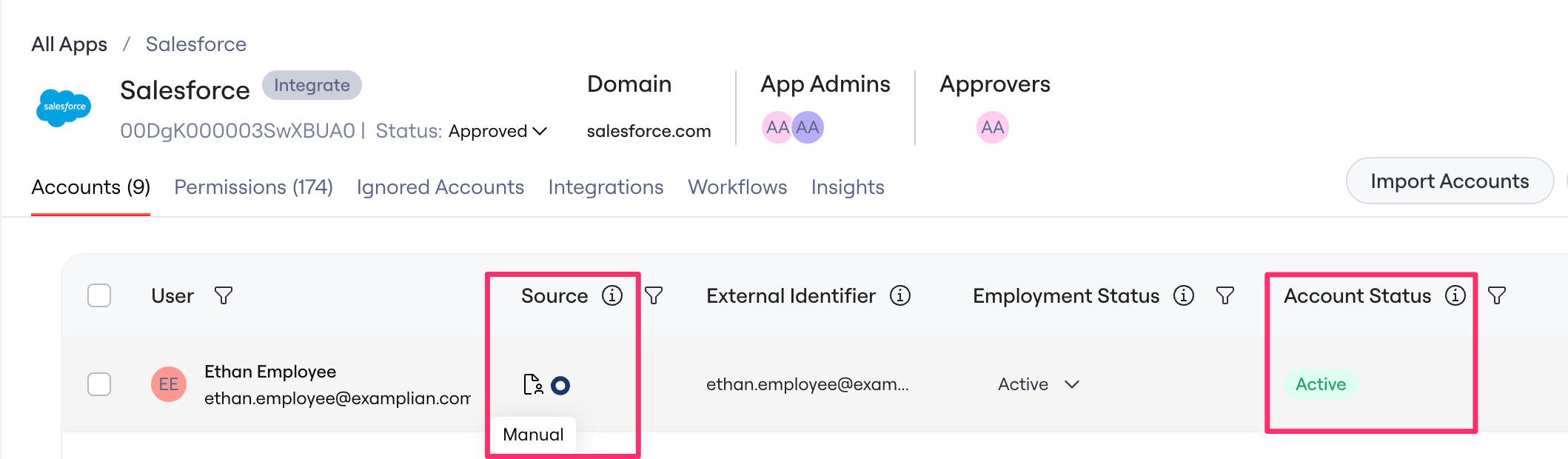
When Lumos discovers accounts from multiple sources (e.g., Okta sync **and** a CSV upload) and [matches these accounts](/kb/identities/configuring-account-to-identity-matching-rules) to a User, it uses a priority system to determine the final **Account Status** displayed for the Account in the UI.
This article explains how that works and highlights common scenarios that can cause confusion.
## How Account Status is Determined
When multiple **found accounts** exist for the same user in the same app, Lumos uses a two-step priority system to determine Account Status.
 ## Step 1: Source Priority
Lumos first ranks found accounts by their [app source:](/kb/appstore/shadow-it-and-app-status/app-source-reference)
| **Priority** | **Source** |
| - | - |
| 0 (highest) | Direct Lumos Integration Screenshot 6.png |
| 1 | Delegated accounts from IdP (Okta, OneLogin) and Manual / CSV Upload Screenshot 7.pngScreenshot 4.png |
| 2 | Google Workspace OAuth, Microsoft OAuth Screenshot 9.pngScreenshot 10.png |
| 3 | Email Inbox Scanning Screenshot 5.pngScreenshot 8.png |
## Step 2: Status Priority (Tiebreaker)
If multiple found accounts have the same source priority, Lumos selects the status that indicates the user **has access**.
**Why?**\
From a security and compliance perspective, it's better to over-report access than under-report it. If even one source says a user has access, Lumos displays them as having access until all sources confirm they don't.
| **Priority** | **Status** | **Meaning** |
| - | - | - |
| 0 (wins) | ACTIVE | User has access |
| 1 | ACCESS\_CREATED | User has access (newly provisioned) |
| 2 | STAGED | User is being provisioned |
| 3 | ARCHIVED | User access is suspended but recoverable |
| 4 | SUSPENDED | User access is suspended |
| 5 | DEPROVISIONED | User access has been removed |
| 6 (loses) | ACCESS\_REMOVED | User access has been removed |
### **Example**
If:
* An **Okta** found account shows SUSPENDED
* A **CSV-uploaded** found account shows ACTIVE
Then:
* Both sources have **priority 1** (tie)
* ACTIVE wins because it indicates the user may still have access
* **Result:** Account displays as ACTIVE
## FAQs
**Why** **does** **an** **account still** **show** **as** **ACTIVE** **when** **I** **already** **removed** **it** **from** **Okta?**
Okta is a **priority** **1** source. If the account was also discovered through another priority 1 source (like a CSV upload) or a higher-priority source (like a direct Lumos integration) that still reports it as ACTIVE, the consolidated Account Status will remain ACTIVE. Check all sources contributing to the account to confirm the removal is reflected everywhere.
Lumos intentionally **over-reports** **access**. If even one if one app source says a user has access, the account displays as ACTIVE until all sources agree they don't.
**I** **uploaded** **a** **CSV** **with** **updated** **statuses,** **but** **nothing** **changed.** **Why?**
CSV uploads are **priority** **1**, the same as delegated sources like Okta. If a direct Lumos integration (priority 0) already reports a status for that account, the integration's status takes precedence regardless of what the CSV says.
**Why did a User with a Suspended Okta account match for an Inactivity Workflow?**
Inactivity workflows evaluate accounts based on their **consolidated Account Status,** not the status from any single source. They target accounts with an Active status (ACTIVE, STAGED, ACCESS\_CREATED, or DISCOVERED). So if the user's Okta found account is SUSPENDED but another source with equal or higher priority still reports the account as ACTIVE, the consolidated Account Status will be **ACTIVE** — and the account becomes eligible for the Inactivity Workflow.
## Step 1: Source Priority
Lumos first ranks found accounts by their [app source:](/kb/appstore/shadow-it-and-app-status/app-source-reference)
| **Priority** | **Source** |
| - | - |
| 0 (highest) | Direct Lumos Integration Screenshot 6.png |
| 1 | Delegated accounts from IdP (Okta, OneLogin) and Manual / CSV Upload Screenshot 7.pngScreenshot 4.png |
| 2 | Google Workspace OAuth, Microsoft OAuth Screenshot 9.pngScreenshot 10.png |
| 3 | Email Inbox Scanning Screenshot 5.pngScreenshot 8.png |
## Step 2: Status Priority (Tiebreaker)
If multiple found accounts have the same source priority, Lumos selects the status that indicates the user **has access**.
**Why?**\
From a security and compliance perspective, it's better to over-report access than under-report it. If even one source says a user has access, Lumos displays them as having access until all sources confirm they don't.
| **Priority** | **Status** | **Meaning** |
| - | - | - |
| 0 (wins) | ACTIVE | User has access |
| 1 | ACCESS\_CREATED | User has access (newly provisioned) |
| 2 | STAGED | User is being provisioned |
| 3 | ARCHIVED | User access is suspended but recoverable |
| 4 | SUSPENDED | User access is suspended |
| 5 | DEPROVISIONED | User access has been removed |
| 6 (loses) | ACCESS\_REMOVED | User access has been removed |
### **Example**
If:
* An **Okta** found account shows SUSPENDED
* A **CSV-uploaded** found account shows ACTIVE
Then:
* Both sources have **priority 1** (tie)
* ACTIVE wins because it indicates the user may still have access
* **Result:** Account displays as ACTIVE
## FAQs
**Why** **does** **an** **account still** **show** **as** **ACTIVE** **when** **I** **already** **removed** **it** **from** **Okta?**
Okta is a **priority** **1** source. If the account was also discovered through another priority 1 source (like a CSV upload) or a higher-priority source (like a direct Lumos integration) that still reports it as ACTIVE, the consolidated Account Status will remain ACTIVE. Check all sources contributing to the account to confirm the removal is reflected everywhere.
Lumos intentionally **over-reports** **access**. If even one if one app source says a user has access, the account displays as ACTIVE until all sources agree they don't.
**I** **uploaded** **a** **CSV** **with** **updated** **statuses,** **but** **nothing** **changed.** **Why?**
CSV uploads are **priority** **1**, the same as delegated sources like Okta. If a direct Lumos integration (priority 0) already reports a status for that account, the integration's status takes precedence regardless of what the CSV says.
**Why did a User with a Suspended Okta account match for an Inactivity Workflow?**
Inactivity workflows evaluate accounts based on their **consolidated Account Status,** not the status from any single source. They target accounts with an Active status (ACTIVE, STAGED, ACCESS\_CREATED, or DISCOVERED). So if the user's Okta found account is SUSPENDED but another source with equal or higher priority still reports the account as ACTIVE, the consolidated Account Status will be **ACTIVE** — and the account becomes eligible for the Inactivity Workflow.