> ## Documentation Index
> Fetch the complete documentation index at: https://docs.lumos.com/llms.txt
> Use this file to discover all available pages before exploring further.
# How to use SAML to configure Lumos user roles
You can now assign roles to Lumos users directly via SAML assertions. This allows you to automate role provisioning from your identity provider (IdP), such as Okta, instead of managing roles manually within the Lumos Admin UI.
## How it works
Lumos looks for a case-sensitive SAML attribute named `roles` during login. This attribute should contain a **comma-delimited string** of Lumos roles to assign to the user. If present, Lumos will **overwrite the user's existing roles** with the ones specified in the assertion.
If the `roles` attribute is **not included** in the assertion, the user’s current roles will be preserved.
## Supported role values
The `roles` attribute must include `USER`, which is required for account access. Additional supported values are:
* `ORGANIZATION_ADMIN`
* `READ_ONLY_ORGANIZATION_ADMIN`
* `AUDITOR`
* `APP_STORE_READ_ONLY_ADMIN`
* `APP_ADMIN`
* `VENDOR_OWNER`
* `VENDOR_AGREEMENT_OWNER`
If any unrecognized roles are included, they will be **silently ignored**.
### Example
```
USER,APP_ADMIN
```
## Important notes
* **Login-time role overwriting:** If the `roles` attribute is included in the assertion, it will **replace all existing roles** for that user in Lumos on every login.
* **Omitting** `roles` **is valid:** If the `roles` attribute is absent, Lumos will make no changes to the user's existing roles.
* **Manual roles can be overridden:** If you assign roles manually in Lumos but also send roles via SAML, the SAML value will always take precedence.
***
## How to configure roles in Okta
To dynamically build a roles attribute that is evaluated at every login, configure it directly in your **SAML application’s Attribute Statements** using **Okta Expression Language**.
### Example Expression
```
String.join(",",
"USER",
isMemberOfGroup("00acbdefghijklmnopqrt") ? "ORGANIZATION_ADMIN" : "",
isMemberOfGroup("00zyxwvutsrqponmlkjih") ? "AUDITOR" : ""
)
```
This expression will always include `USER`, and then append additional roles depending on the user’s group membership. Note that you must use the Okta Group IDs, rather than display names.
### Where to Configure
1. In the Okta Admin Console, open your **SAML application**.
2. Under the **General** tab, click on **SAML Settings** > **Edit**
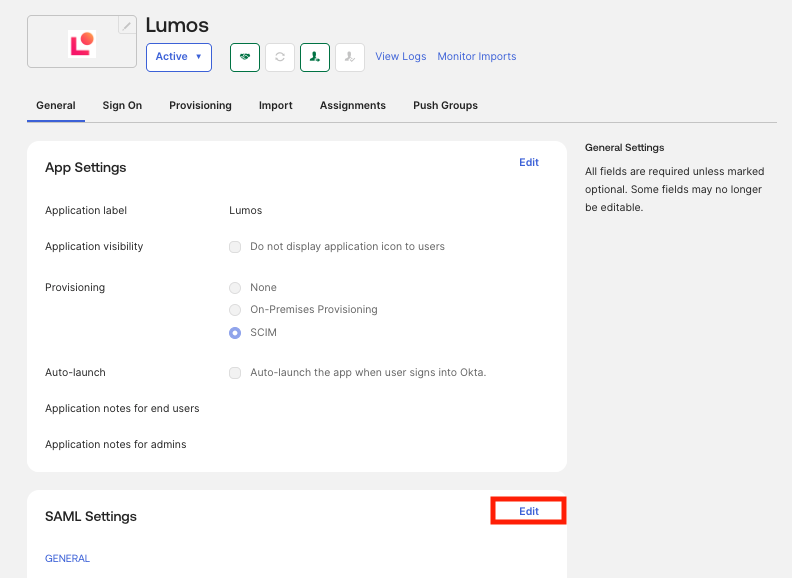 1. Click **Edit** and go through the SAML settings wizard.
2. In the **Attribute Statements (Optional)** section, add a new attribute `roles` and paste your organization's version of the expression above as the value.
1. Click **Edit** and go through the SAML settings wizard.
2. In the **Attribute Statements (Optional)** section, add a new attribute `roles` and paste your organization's version of the expression above as the value.
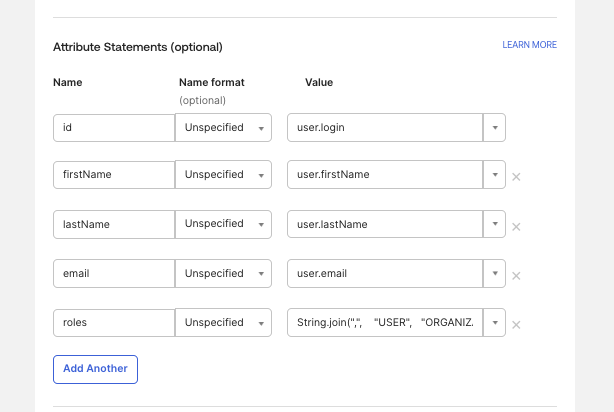 3. Use the **Preview SAML Assertion** feature to verify the `roles` attribute is populating as expected
 4. Save your changes.
***
## Testing and troubleshooting
* Use the **SAML tracer** in your browser or the **SAML Test Connector** in Okta to confirm the `roles` attribute is present and correctly formatted.
* Ensure your role string:
* is comma-delimited
* includes `USER`
* avoids trailing commas or spaces
If a user logs in and is missing expected permissions, check whether SAML is overwriting their roles unintentionally.
***
## Need help?
If you’re unsure how to format your SAML assertion or want help configuring your Okta integration, reach out to Lumos Support.
4. Save your changes.
***
## Testing and troubleshooting
* Use the **SAML tracer** in your browser or the **SAML Test Connector** in Okta to confirm the `roles` attribute is present and correctly formatted.
* Ensure your role string:
* is comma-delimited
* includes `USER`
* avoids trailing commas or spaces
If a user logs in and is missing expected permissions, check whether SAML is overwriting their roles unintentionally.
***
## Need help?
If you’re unsure how to format your SAML assertion or want help configuring your Okta integration, reach out to Lumos Support.