> ## Documentation Index
> Fetch the complete documentation index at: https://docs.lumos.com/llms.txt
> Use this file to discover all available pages before exploring further.
# Importing Title Data
## Background
This article breaks down the Title field in your [Source of Truth](/kb/appstore/source-of-truth/source-of-truth), including how and why you set it, the impact of making changes to it, and common questions or issues.
## Purpose and function
The **Title** field helps inform many important workflows in Lumos. You'll see the Team value show up:
* As a column in your Access Reviews to help reviewers understand more about the employee when making decisions.
* In access requests made from the AppStore to provide useful context during approvals. *See[Approving Access Requests](/kb/quick_start_guide/appstore-1/appstore_explainers_for_new_employees_new_to_appstore/approving-access-requests)*
* When targeting the scope of an access review to specific employees. *See[Scoping Your Access Review](/kb/access-reviews/preparing-and-completing-an-access-review/scoping-your-access-review)*
* When viewing the list of user accounts discovered for an individual application.
* For segmenting spend in the Lumos analytics dashboard.
## Editing Title settings
### 1. Go to your [Source of Truth settings](https://app.lumosidentity.com/settings/source_of_truth).
### 2. Find the *Title* section and click "Edit".
 ### 3. Choose the *Source App* that holds the most accurate user data.
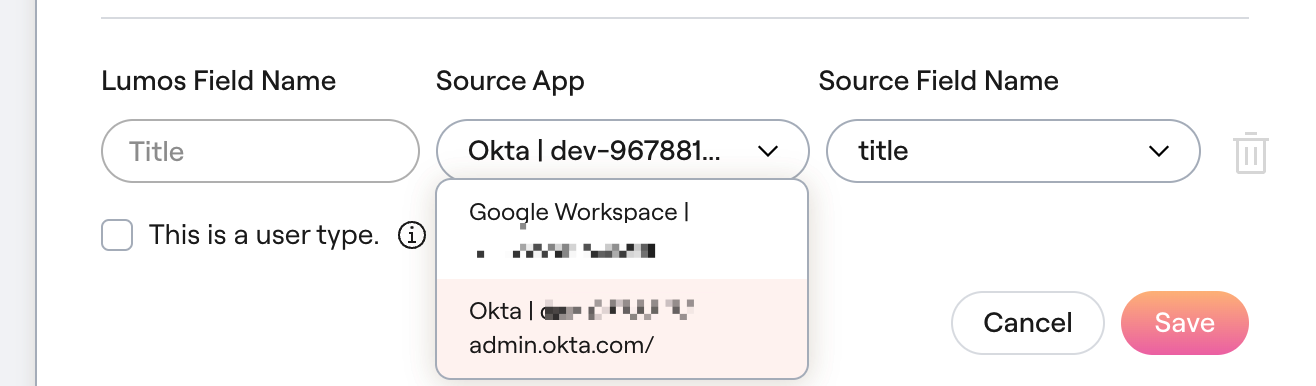 If the app you choose here is different from your Primary Integration, [contact Lumos support](mailto:support@lumos.com) to avoid issues. *See[Importing User Sources](/kb/appstore/source-of-truth/importing-user-sources)*
### 4. In the *Source Field Name*, choose the name of the field that holds the title data and click "Save".
If the app you choose here is different from your Primary Integration, [contact Lumos support](mailto:support@lumos.com) to avoid issues. *See[Importing User Sources](/kb/appstore/source-of-truth/importing-user-sources)*
### 4. In the *Source Field Name*, choose the name of the field that holds the title data and click "Save".
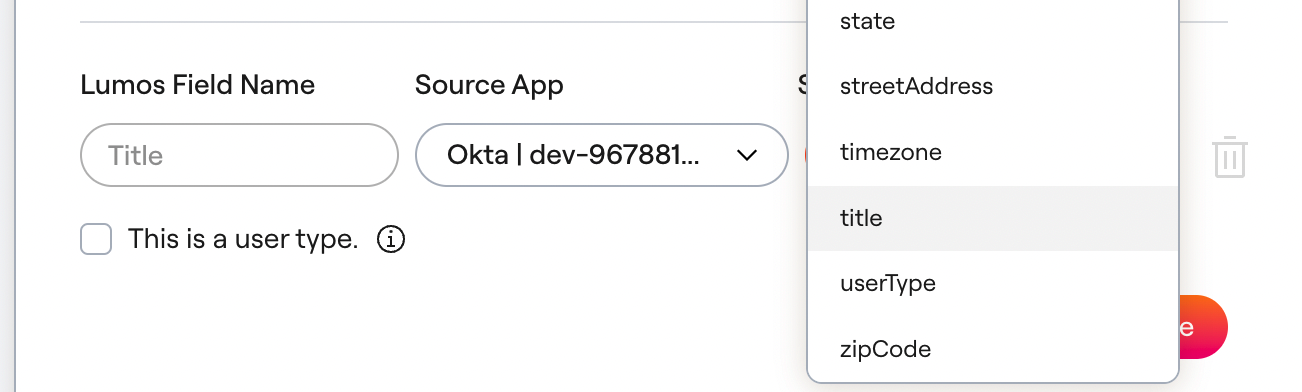 Below you can find more context around which fields are supported. **Make sure you choose a supported field.** *See[Importing Team Data](/kb/appstore/source-of-truth/importing-team-data)*
## FAQs
### From which apps and fields can Lumos source title data?
The following apps + app fields can be used to source Title data.
| **Field** | **Source** | **Notes** |
| - | - | - |
| Google Workspace Title | [User.organizations\[\].title](https://developers.google.com/admin-sdk/directory/reference/rest/v1/users#:~:text=organizations%5B%5D.title) | Lumos first looks for [User.organizations\[\].primary](https://developers.google.com/admin-sdk/directory/reference/rest/v1/users#:~:text=organizations%5B%5D.primary) to get [User.organizations\[\].title](https://developers.google.com/admin-sdk/directory/reference/rest/v1/users#:~:text=organizations%5B%5D.title). If there is no primary organization, Lumos uses the first non-empty title that is returned by Google. |
| Okta | Any Okta profile field | |
| BambooHR | [Employee.JobTitle](https://documentation.bamboohr.com/docs/list-of-field-names) | |
| Microsoft Entra ID | [user.jobTitle](https://learn.microsoft.com/en-us/graph/api/resources/user?view=graph-rest-1.0#properties) | |
| Workday | `Worker_Data -> Employment_Data -> Worker_Job_Data -> Position_Data -> Position_Title` | |
Below you can find more context around which fields are supported. **Make sure you choose a supported field.** *See[Importing Team Data](/kb/appstore/source-of-truth/importing-team-data)*
## FAQs
### From which apps and fields can Lumos source title data?
The following apps + app fields can be used to source Title data.
| **Field** | **Source** | **Notes** |
| - | - | - |
| Google Workspace Title | [User.organizations\[\].title](https://developers.google.com/admin-sdk/directory/reference/rest/v1/users#:~:text=organizations%5B%5D.title) | Lumos first looks for [User.organizations\[\].primary](https://developers.google.com/admin-sdk/directory/reference/rest/v1/users#:~:text=organizations%5B%5D.primary) to get [User.organizations\[\].title](https://developers.google.com/admin-sdk/directory/reference/rest/v1/users#:~:text=organizations%5B%5D.title). If there is no primary organization, Lumos uses the first non-empty title that is returned by Google. |
| Okta | Any Okta profile field | |
| BambooHR | [Employee.JobTitle](https://documentation.bamboohr.com/docs/list-of-field-names) | |
| Microsoft Entra ID | [user.jobTitle](https://learn.microsoft.com/en-us/graph/api/resources/user?view=graph-rest-1.0#properties) | |
| Workday | `Worker_Data -> Employment_Data -> Worker_Job_Data -> Position_Data -> Position_Title` | |