> ## Documentation Index
> Fetch the complete documentation index at: https://docs.lumos.com/llms.txt
> Use this file to discover all available pages before exploring further.
# Configuring Custom Intake Fields
## **Background**
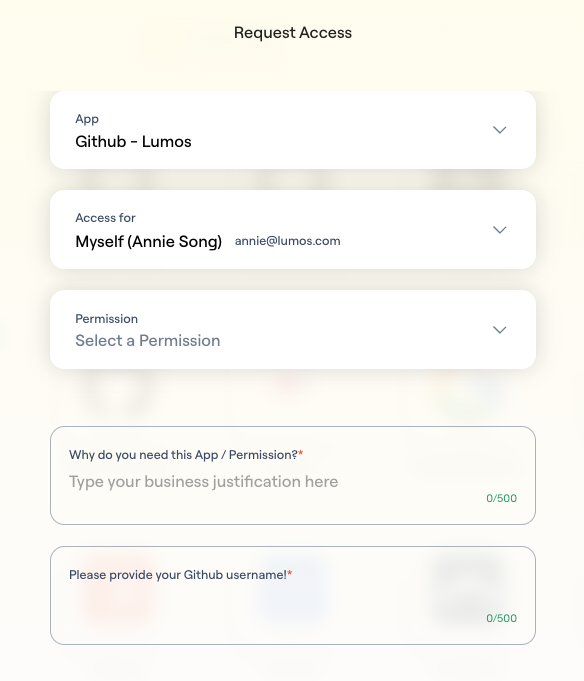
Custom intake fields collect the information your provisioners need before a requester can submit an AppStore request. For example, you can require the requester's GitHub username so that it appears in your provisioning notification.
## **Instructions**
### **1. Navigate to the app's AppStore settings**
You should see a new section called Custom Fields:
### **2. Click +Add New Field, and you'll select either a Text or Single Select option.**
**If Text Field:**
Add your prompt (for example, 'Please enter your GitHub username') and add an optional description.
**If Single Select Dropdown:**
Add your prompt and add an optional description. Click "Next", which will pop open a modal for you to enter in your dropdown values. You can use Enter as your delimiter here. Lumos supports up to 50 values in the dropdown.
### **3. Setup complete**
When users request this app, they'll now be asked to populate these required values.
 ## **FAQs**
#### **1. Where can I see the user responses to the custom intake form questions?**
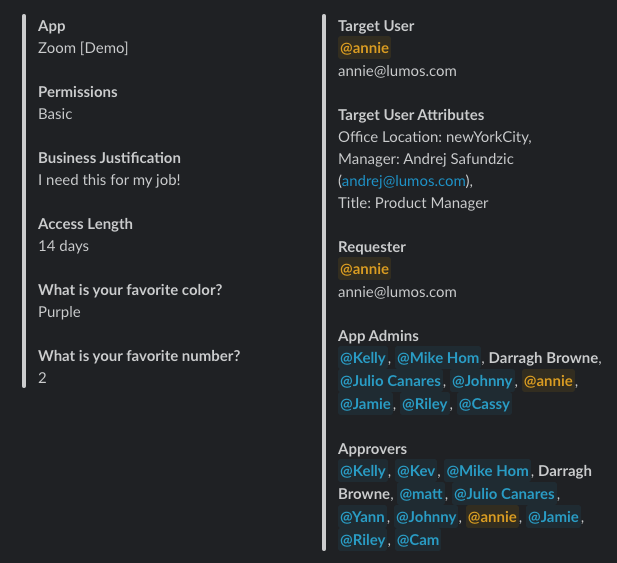
Notifications (Slack, email), the Lumos Task Center, ITSM, SIEM, and the Activity Log.
## **FAQs**
#### **1. Where can I see the user responses to the custom intake form questions?**
Notifications (Slack, email), the Lumos Task Center, ITSM, SIEM, and the Activity Log.
 #### **2. Can I configure a multi-select dropdown?**
This is not available today.
#### **3. How does this work with access policies?**
Lumos is working on a smoother experience to handle this. In the interim, the admin will need to set the required values when creating the access policy.
#### **4. What is the max number of custom intake fields I can configure on an app?**
Eight. Contact your CSM if this doesn’t work for your use case.
#### **5. What happens if I delete a custom intake field while there are in-flight requests?**
Lumos keeps the data on the request, and the request still proceeds.
#### **6. As an approver, can I make updates to these answers while the request is live?**
Not yet. This capability is coming soon.
#### **7. Can I configure fields to not be required (optional)?**
This is not available today, but you can continue using the instructions field to instruct users to add optional fields in the business justification.
#### **2. Can I configure a multi-select dropdown?**
This is not available today.
#### **3. How does this work with access policies?**
Lumos is working on a smoother experience to handle this. In the interim, the admin will need to set the required values when creating the access policy.
#### **4. What is the max number of custom intake fields I can configure on an app?**
Eight. Contact your CSM if this doesn’t work for your use case.
#### **5. What happens if I delete a custom intake field while there are in-flight requests?**
Lumos keeps the data on the request, and the request still proceeds.
#### **6. As an approver, can I make updates to these answers while the request is live?**
Not yet. This capability is coming soon.
#### **7. Can I configure fields to not be required (optional)?**
This is not available today, but you can continue using the instructions field to instruct users to add optional fields in the business justification.