> ## Documentation Index
> Fetch the complete documentation index at: https://docs.lumos.com/llms.txt
> Use this file to discover all available pages before exploring further.
# Tracking AppStore Rollout Success with Lumos
## Background
**Lumos Analytics for AppStore Reporting** shows how quickly employees get access, which apps take the longest to approve, and how your AppStore rollout is progressing. Use it to report to leadership and identify opportunities to improve your AppStore.
## AppStore Adoption Trends
View your AppStore's overall adoption trends to understand your progress toward rolling out the AppStore to your entire organization and how quickly people are getting access.
### Overall Adoption Trends
The Overall Adoption metrics are defined as follows. Use them to track uptake and ensure people are getting access quickly.
1. **AppStore Adoption** — Calculated by comparing your total ITSM ticket volume with tickets logged in Lumos to show where employees go to make their access requests. If your AppStore is not connected to an ITSM, this datapoint will not be available. Note that if you have ITSM logging turned on \[in ITSM Settings] this number should reflect that.
2. **Resolved Requests** — No. of successfully provisioned requests
3. **Median Time to Resolution** — Time taken for users to get provisioned access
4. **Median Time to Approval** — Time taken to get approvals for access requests
### Request Volume Trend
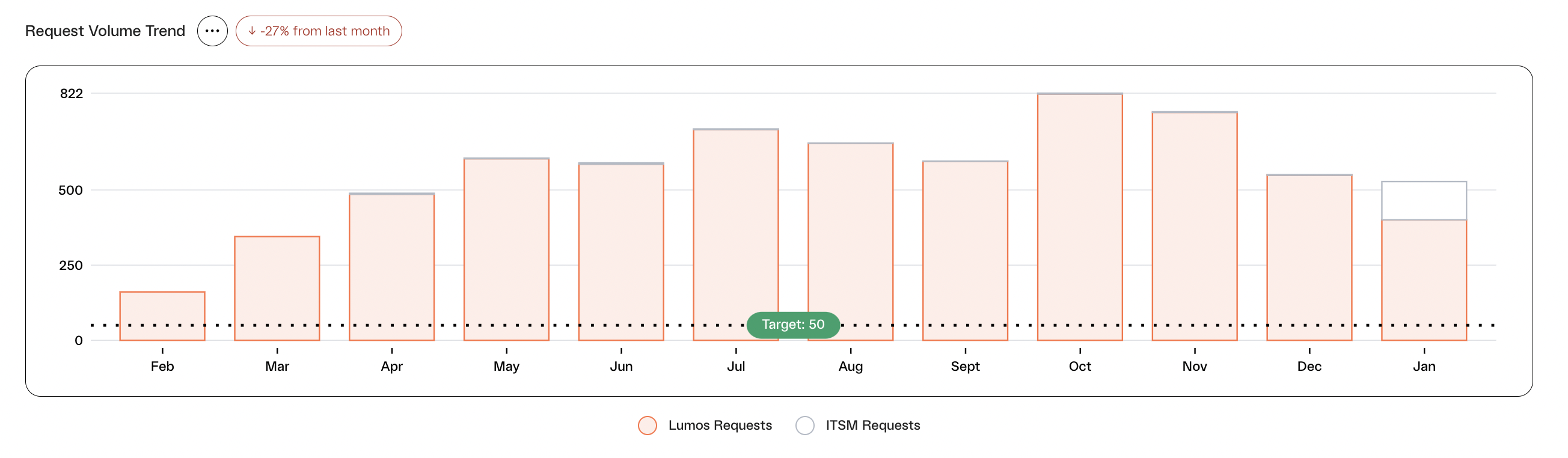
As you roll out your AppStore, Lumos will show you the breakdown of ticket volume between access requests tickets in your ITSM vs. tickets being provisioned in Lumos. This not only helps demonstrate a successful AppStore rollout with employee adoption, but also shows how many tickets are getting orchestrated and automated through Lumos.
 ## Time to Resolution (TTR) Trend
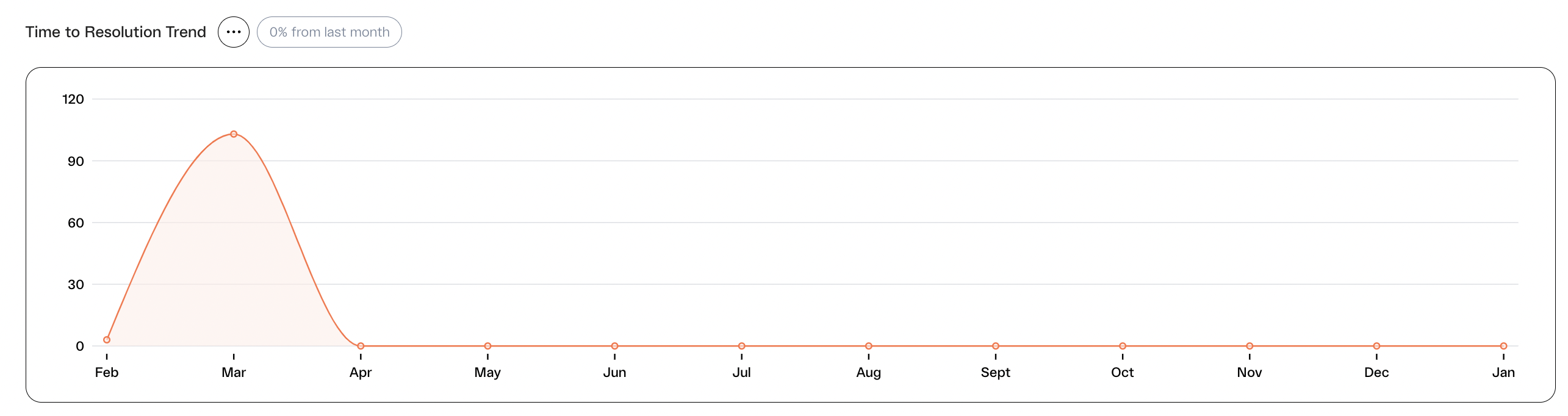
#### Ensure and demonstrate that you are automating more and driving operational efficiency for your end users. Confirm that Lumos is allowing users to get access faster than your old process.
## Time to Resolution (TTR) Trend
#### Ensure and demonstrate that you are automating more and driving operational efficiency for your end users. Confirm that Lumos is allowing users to get access faster than your old process.
 ## Software Access Bottlenecks
#### Identify the biggest areas of opportunity to improve your Time-To-Resolution and SLAs.
#### **Automated Ticket Trend**
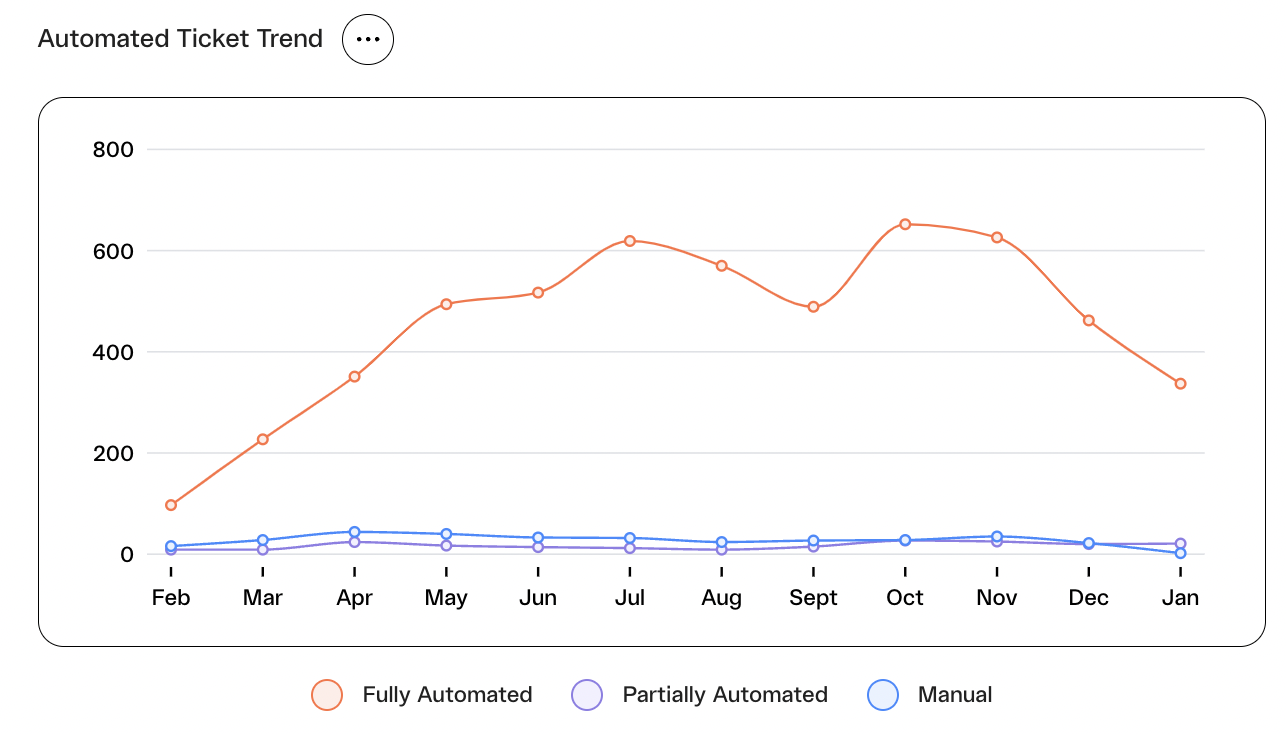
#### Report to your leadership on how much access request traffic you automated. See what breakdown of access requests were fully automated, partially automated, or manual. A request can be automated by attaching a provisioning group or firing off a webhook, so that the user can be automatically provisioned.
## Software Access Bottlenecks
#### Identify the biggest areas of opportunity to improve your Time-To-Resolution and SLAs.
#### **Automated Ticket Trend**
#### Report to your leadership on how much access request traffic you automated. See what breakdown of access requests were fully automated, partially automated, or manual. A request can be automated by attaching a provisioning group or firing off a webhook, so that the user can be automatically provisioned.
 * See at a glance what apps are approval/provisioning bottlenecks for my organization. Understand which apps are slowing down your ability to provide a quality experience for your end users, and find areas to automate or set up pre-approval rules to streamline these processes.
## Request Traffic by Team
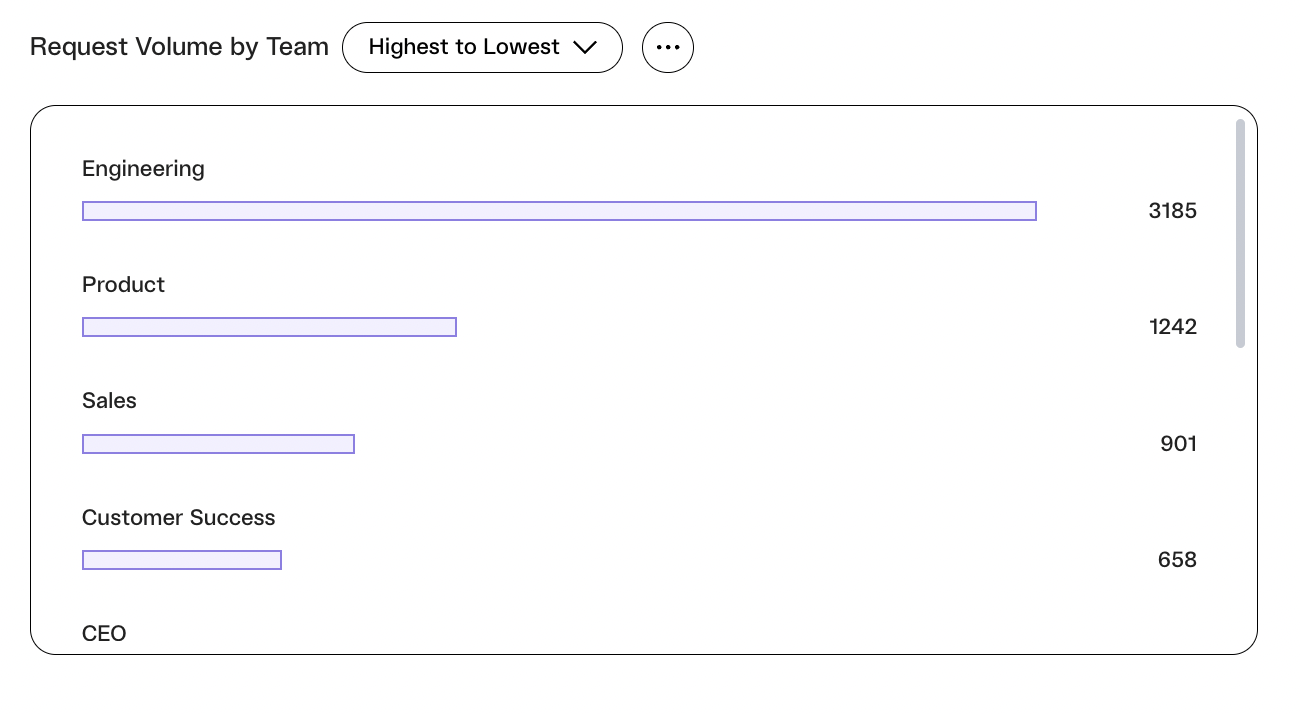
Get the insights you need to share accurate numbers with department heads and understand company wide adoption of your AppStore.
* See at a glance what apps are approval/provisioning bottlenecks for my organization. Understand which apps are slowing down your ability to provide a quality experience for your end users, and find areas to automate or set up pre-approval rules to streamline these processes.
## Request Traffic by Team
Get the insights you need to share accurate numbers with department heads and understand company wide adoption of your AppStore.
 ## FAQ
### Why am I not seeing any data?
If you happen to see what looks like dummy data in your environment, this is because you haven't sent any access requests yet. Send one through Lumos by following these instructions: [Requesting Access to an App](/kb/quick_start_guide/appstore-1/appstore_explainers_for_new_employees_new_to_appstore/requesting-access-to-an-app)
### How do I see my ITSM data?
If you have your ITSM connected in Lumos, you can configure your ITSM data for reporting by going to [Settings](https://app.lumosidentity.com/settings/itsm) and toggling on "Allow Logging for Reporting". You can then configure projects to sync.
### How recent is this data?
Data for Lumos requests and ITSM refreshes overnight.
### Who can view these reports in Lumos?
Currently all Lumos admins will be able to view these reports in Lumos. A dedicated admin role to only view Analytics is not available today. To share these reports without giving someone access, download the CSVs or take screenshots.
### How do I change my benchmark value?
Contact your CSM to change or remove these benchmark values from your Analytics page. As a reminder, this benchmark will show for all users able to view the AppStore Analytics tab.
### Can I adjust the time frame of the Analytics tab?
Yes. At the top of the screen, the page defaults to the **Last 12 Months** on a **Monthly**cadence. You can adjust the look-back window to be Last Month, Last 3 Months, or even Last 6 Months. Additionally, you will be able to select between a Monthly and Weekly cadence. Lumos remembers these settings for next time.
## FAQ
### Why am I not seeing any data?
If you happen to see what looks like dummy data in your environment, this is because you haven't sent any access requests yet. Send one through Lumos by following these instructions: [Requesting Access to an App](/kb/quick_start_guide/appstore-1/appstore_explainers_for_new_employees_new_to_appstore/requesting-access-to-an-app)
### How do I see my ITSM data?
If you have your ITSM connected in Lumos, you can configure your ITSM data for reporting by going to [Settings](https://app.lumosidentity.com/settings/itsm) and toggling on "Allow Logging for Reporting". You can then configure projects to sync.
### How recent is this data?
Data for Lumos requests and ITSM refreshes overnight.
### Who can view these reports in Lumos?
Currently all Lumos admins will be able to view these reports in Lumos. A dedicated admin role to only view Analytics is not available today. To share these reports without giving someone access, download the CSVs or take screenshots.
### How do I change my benchmark value?
Contact your CSM to change or remove these benchmark values from your Analytics page. As a reminder, this benchmark will show for all users able to view the AppStore Analytics tab.
### Can I adjust the time frame of the Analytics tab?
Yes. At the top of the screen, the page defaults to the **Last 12 Months** on a **Monthly**cadence. You can adjust the look-back window to be Last Month, Last 3 Months, or even Last 6 Months. Additionally, you will be able to select between a Monthly and Weekly cadence. Lumos remembers these settings for next time.