> ## Documentation Index
> Fetch the complete documentation index at: https://docs.lumos.com/llms.txt
> Use this file to discover all available pages before exploring further.
# Lumos Task Center
## Background
Certain access management processes require manual work from your end users. Some of these are routed via notification and are immediately actionable from Slack or email, but all users can navigate to the [Lumos Task Center](https://app.lumosidentity.com/admin-tasks?tab=my_tasks) to act on the tasks routed to them.
### The updated Task Center
Lumos is rolling out changes from January through early February. All upcoming changes are listed here.
## Before
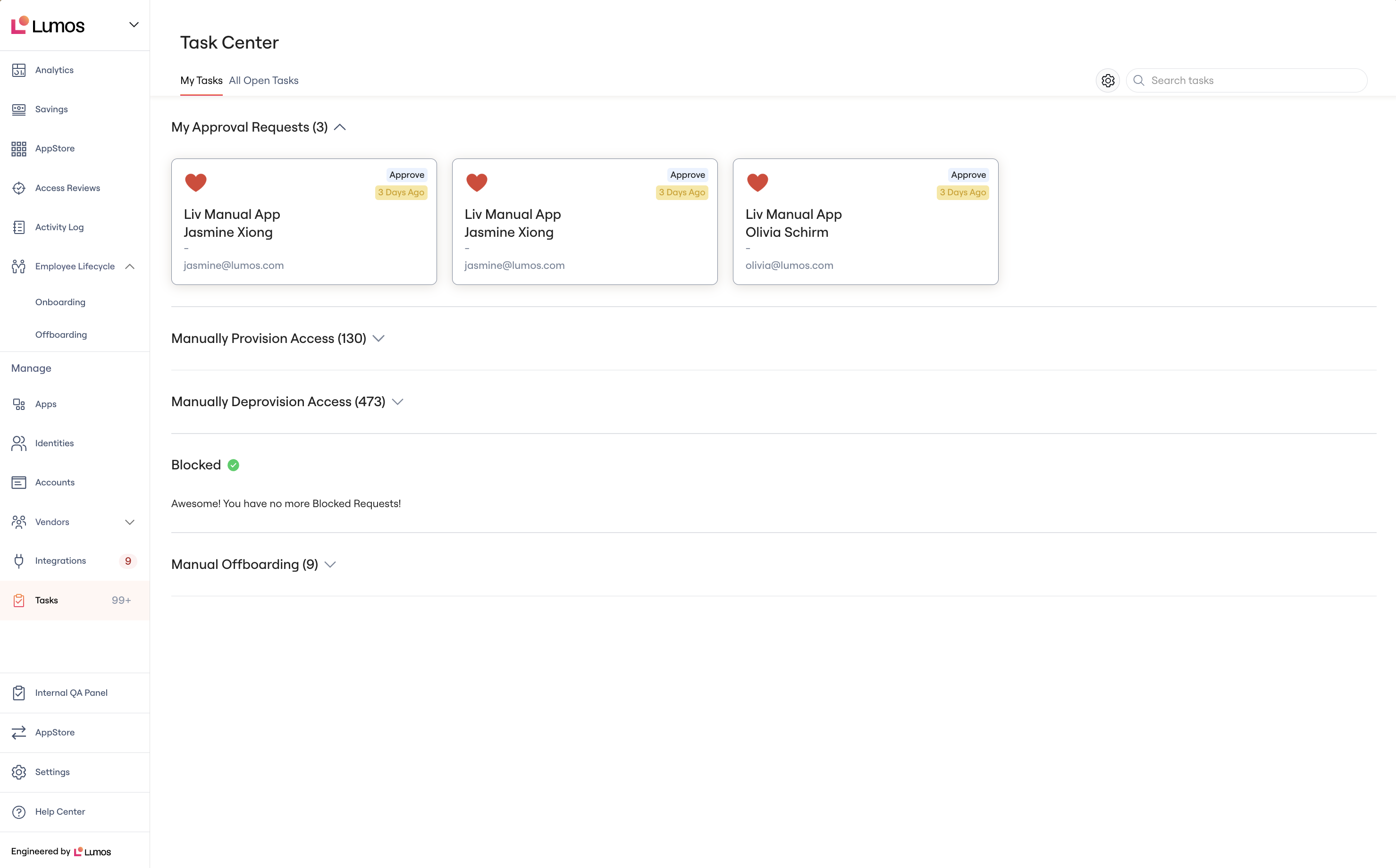 * A card-style layout, with built-in sections denoting:
* My Approval Requests
* Manually Provision Access
* Manually Deprovision Access
* Blocked Tasks
* Manual Offboarding
* Sections for My Tasks and All Other Tasks (only visible if you're a Lumos admin)
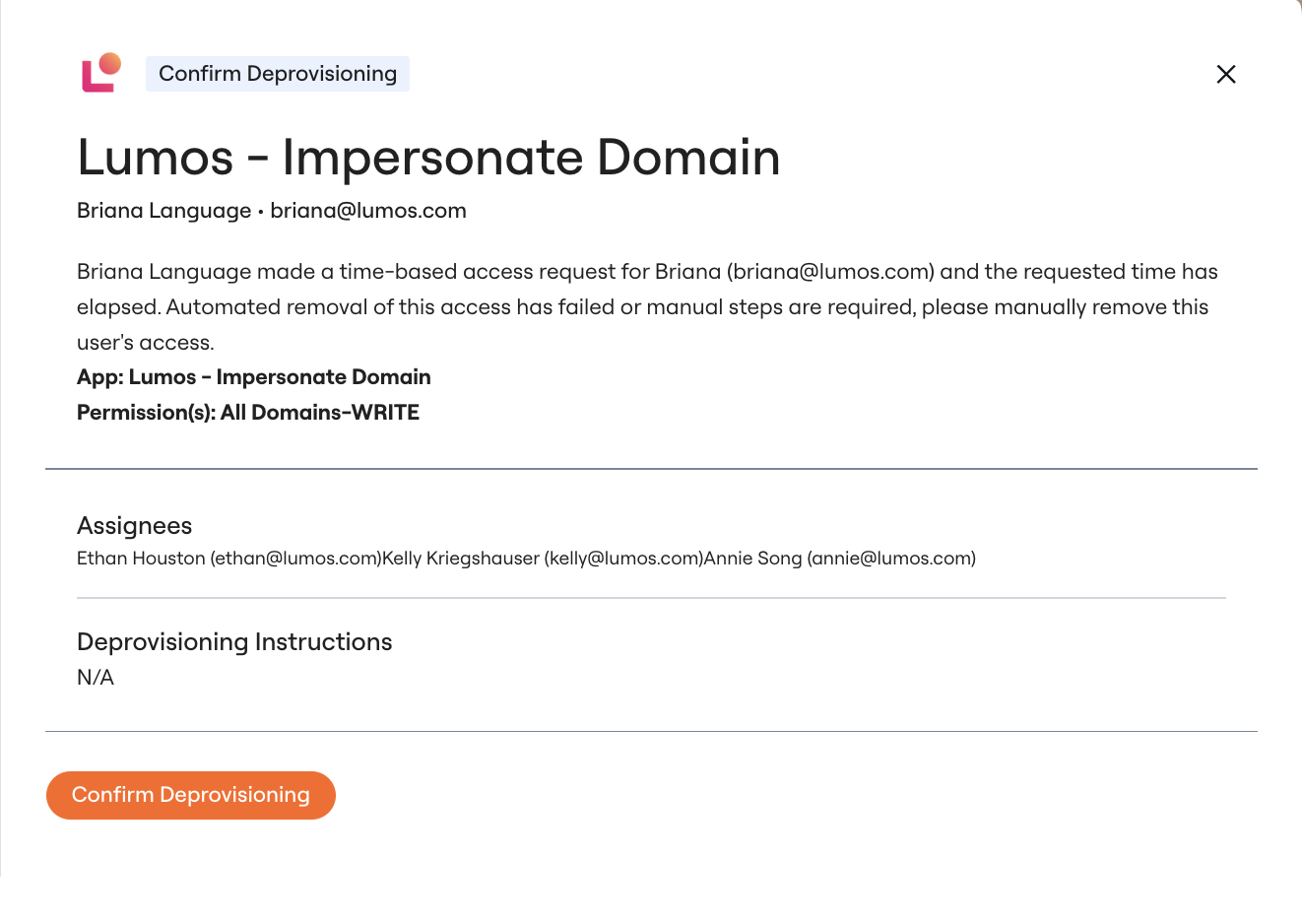
* Different drawer views based on the Task Type
* A card-style layout, with built-in sections denoting:
* My Approval Requests
* Manually Provision Access
* Manually Deprovision Access
* Blocked Tasks
* Manual Offboarding
* Sections for My Tasks and All Other Tasks (only visible if you're a Lumos admin)
* Different drawer views based on the Task Type
 * Reported Performance Issues - problems with:
* Loading all the tasks
* Searching
* Acknowledging tasks that would cause lag
## Now
* Reported Performance Issues - problems with:
* Loading all the tasks
* Searching
* Acknowledging tasks that would cause lag
## Now
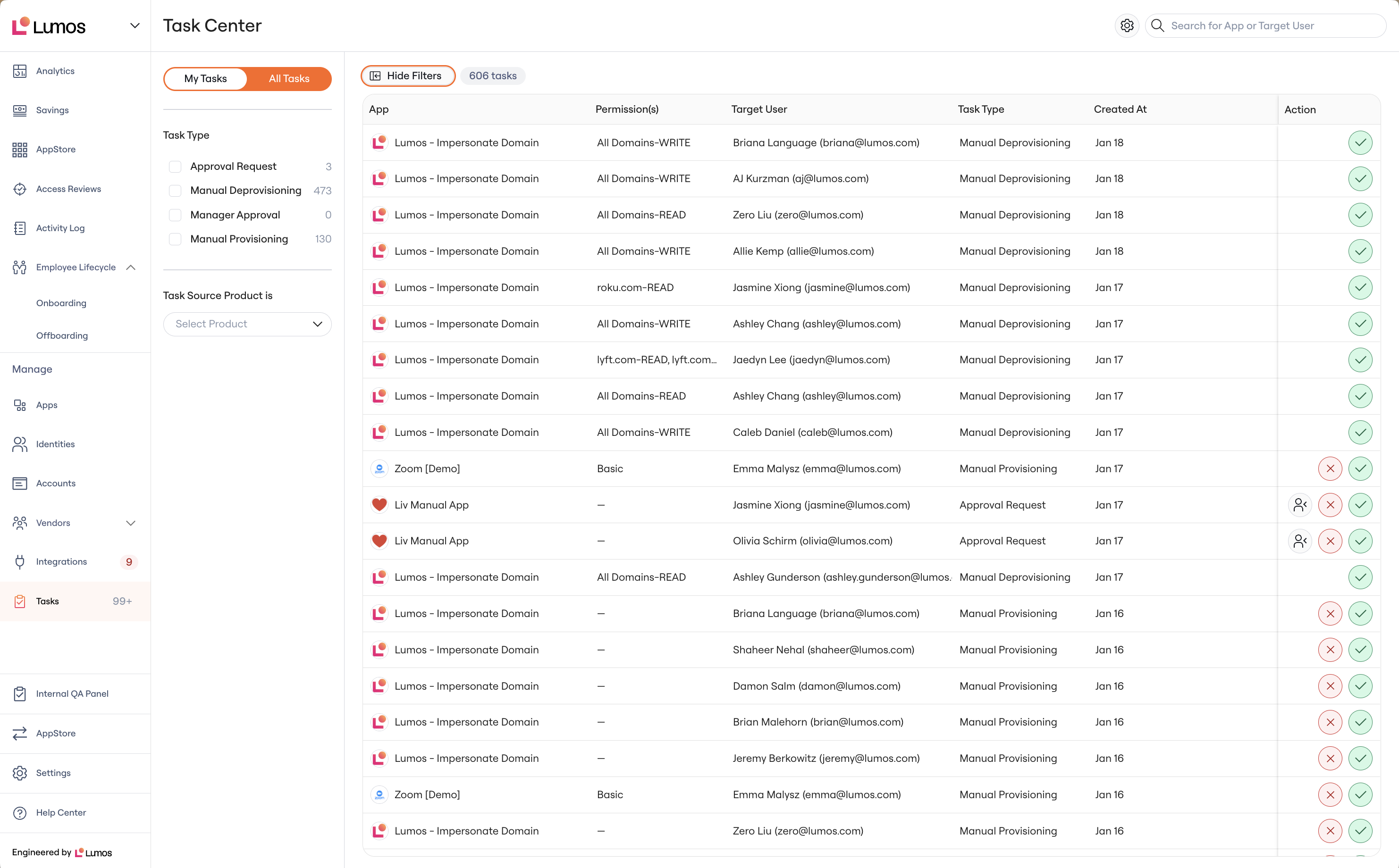 * A table style layout, with infinite scroll, so you can view more tasks.
* Filters:
* Task Type - this should be the same groupings from the old task center.
* Task Source Product - this indicates which Lumos product/flow created the task
* AppStore: Tasks related to self-service access requests
* Offboarding: Manual removal tasks generated from employee terminations
* Onboarding: Tasks related to onboarding (provisioning)
* Platform: Manual removal tasks routed from the Single app pages.
* Toggle on the top left for My Tasks and All Other Tasks
* Sort in the table by ascending or descending
* A standardized task view with key information around the target user and request.
* A table style layout, with infinite scroll, so you can view more tasks.
* Filters:
* Task Type - this should be the same groupings from the old task center.
* Task Source Product - this indicates which Lumos product/flow created the task
* AppStore: Tasks related to self-service access requests
* Offboarding: Manual removal tasks generated from employee terminations
* Onboarding: Tasks related to onboarding (provisioning)
* Platform: Manual removal tasks routed from the Single app pages.
* Toggle on the top left for My Tasks and All Other Tasks
* Sort in the table by ascending or descending
* A standardized task view with key information around the target user and request.
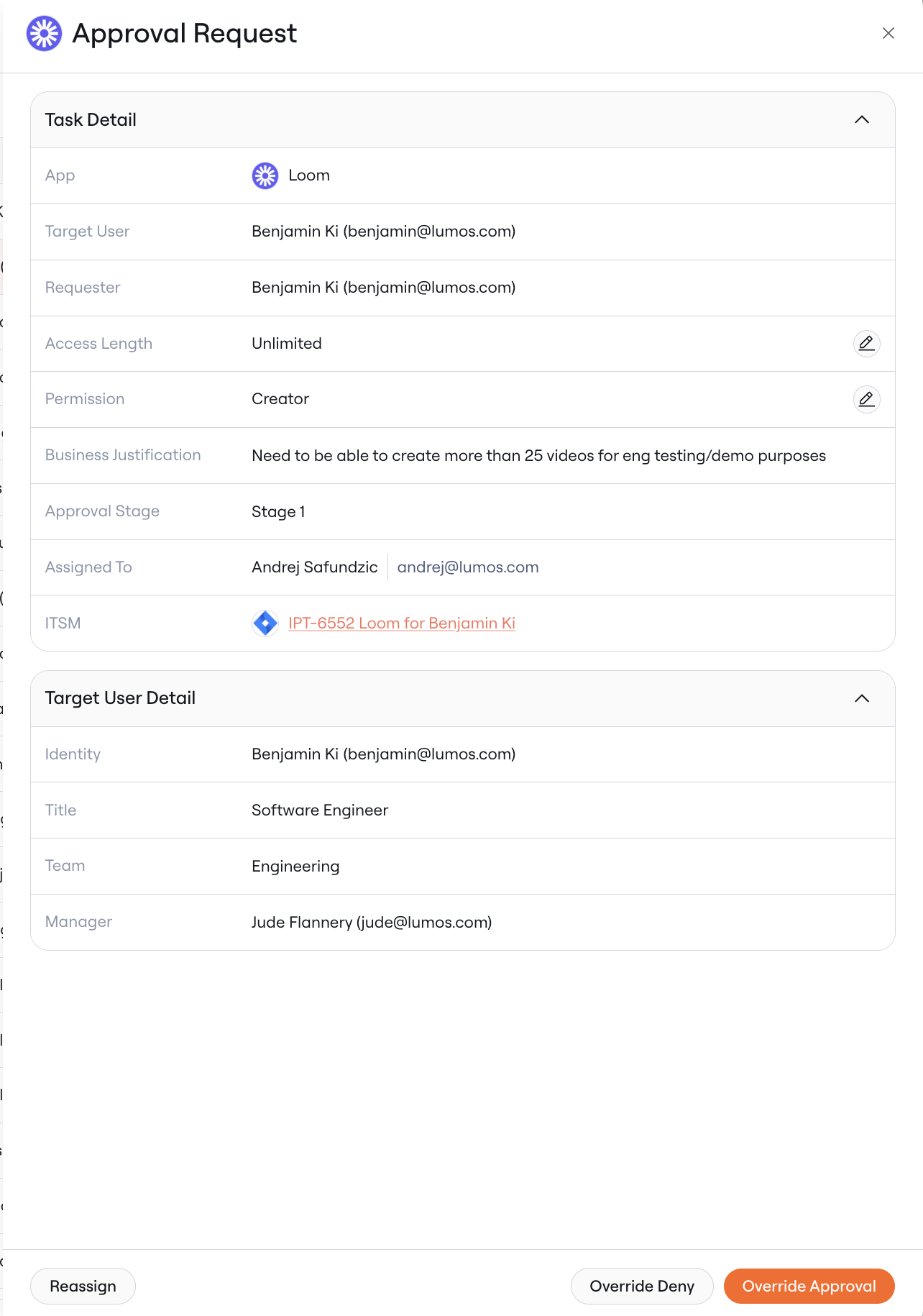 * An ability to deep link your tasks to send to other users.
* Performance improvements - faster:
* Searching
* Loading experiences
* Updates in the table when you act on the requests.
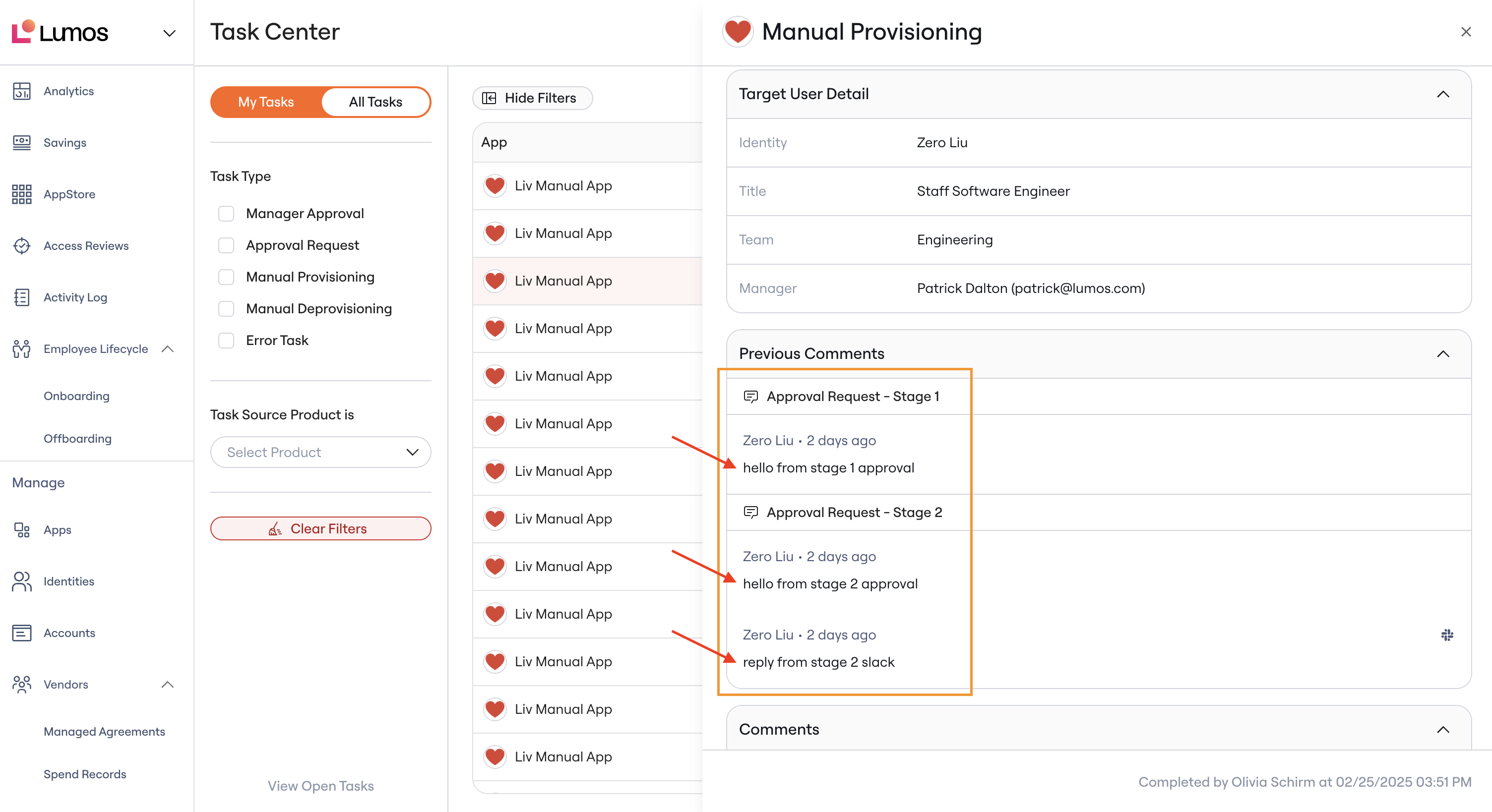
* Direct commenting within the task detail drawer within the Web UI. Admins and task assignees can post comments, notifying other assignees and requesters. In multi-staged requests, admins can view all comments from earlier stages.
* An ability to deep link your tasks to send to other users.
* Performance improvements - faster:
* Searching
* Loading experiences
* Updates in the table when you act on the requests.
* Direct commenting within the task detail drawer within the Web UI. Admins and task assignees can post comments, notifying other assignees and requesters. In multi-staged requests, admins can view all comments from earlier stages.
 * [Error Tasks](/kb/appstore/access-request-handling/error-tasks-in-lumos). See this article for more information on these task types.
## Soon
*Lumos is rolling out these features over the next few weeks.*
* More filtering capabilities
* Assignee
* App
## Limitations
There are a couple of legacy tasks that are not supported on the new task center.
They are:
* Legacy offboarding removal tasks - these are created when a task has been created for the app admin to remove access.
* Legacy time based access expiration tasks - these are created when a time based access request in the AppStore has expired and generates a task due to (1) an error in the deprovisioning or (2) the provisioning plan also having a manual provisioning step, kicking over a manual deprovisioning step to the end user.
The Lumos team will reach out to help close out these old tasks. Lumos has since migrated these flows to create tasks that are supported in the Task Center, so all of these tasks should be quite old.
You can still navigate to the old task center for the time being and act on tasks there.
## FAQs
* **I need to go to the old task center, is this possible?**
* Yes. Press the gear icon at the top right next to the Search bar and click "Switch to classic task center". This will save your settings and will continue to route you back to the classic task center.
* You will still be able to act on tasks normally as you once did in the old task center.
* Note: Lumos will eventually deprecate the classic view.
* **I have some feedback, how can I get this to the team?**
* Contact your CSM or [support@lumos.com](mailto:support@lumos.com).
* **Can I make a saved view to return to?**
* This is not supported today. Lumos may build support for this in the next quarter or two.
* [Error Tasks](/kb/appstore/access-request-handling/error-tasks-in-lumos). See this article for more information on these task types.
## Soon
*Lumos is rolling out these features over the next few weeks.*
* More filtering capabilities
* Assignee
* App
## Limitations
There are a couple of legacy tasks that are not supported on the new task center.
They are:
* Legacy offboarding removal tasks - these are created when a task has been created for the app admin to remove access.
* Legacy time based access expiration tasks - these are created when a time based access request in the AppStore has expired and generates a task due to (1) an error in the deprovisioning or (2) the provisioning plan also having a manual provisioning step, kicking over a manual deprovisioning step to the end user.
The Lumos team will reach out to help close out these old tasks. Lumos has since migrated these flows to create tasks that are supported in the Task Center, so all of these tasks should be quite old.
You can still navigate to the old task center for the time being and act on tasks there.
## FAQs
* **I need to go to the old task center, is this possible?**
* Yes. Press the gear icon at the top right next to the Search bar and click "Switch to classic task center". This will save your settings and will continue to route you back to the classic task center.
* You will still be able to act on tasks normally as you once did in the old task center.
* Note: Lumos will eventually deprecate the classic view.
* **I have some feedback, how can I get this to the team?**
* Contact your CSM or [support@lumos.com](mailto:support@lumos.com).
* **Can I make a saved view to return to?**
* This is not supported today. Lumos may build support for this in the next quarter or two.