> ## Documentation Index
> Fetch the complete documentation index at: https://docs.lumos.com/llms.txt
> Use this file to discover all available pages before exploring further.
# AppStore Notifications
## Background
Lumos automatically reminds people of tasks they have to complete in the AppStore so that you don't have to.
This article explains how AppStore notification logic works and how to configure the settings. For information on Access Review notifications, see [Access Review Notifications](/kb/access-reviews/preparing-and-completing-an-access-review/access-review-notifications)
## Task Center reminders
Lumos delivers a reminder to anyone that has an incomplete task in the [Task Center](https://app.lumosidentity.com/tasks?tab=my_tasks) once a day via Slack (reminders are not sent today via email). This reminder will contain a link to the Task Center so that the employee can find all of their tasks in one place.
These reminders are delivered at **17:00 UTC**. If you need to configure a different time for your tenant, contact [support@lumos.com](mailto:support@lumos.com).
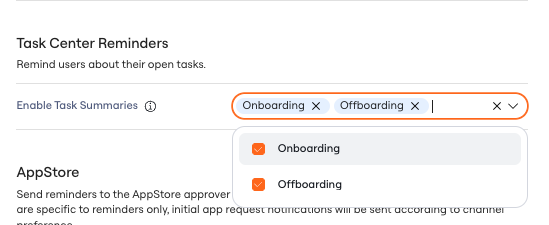
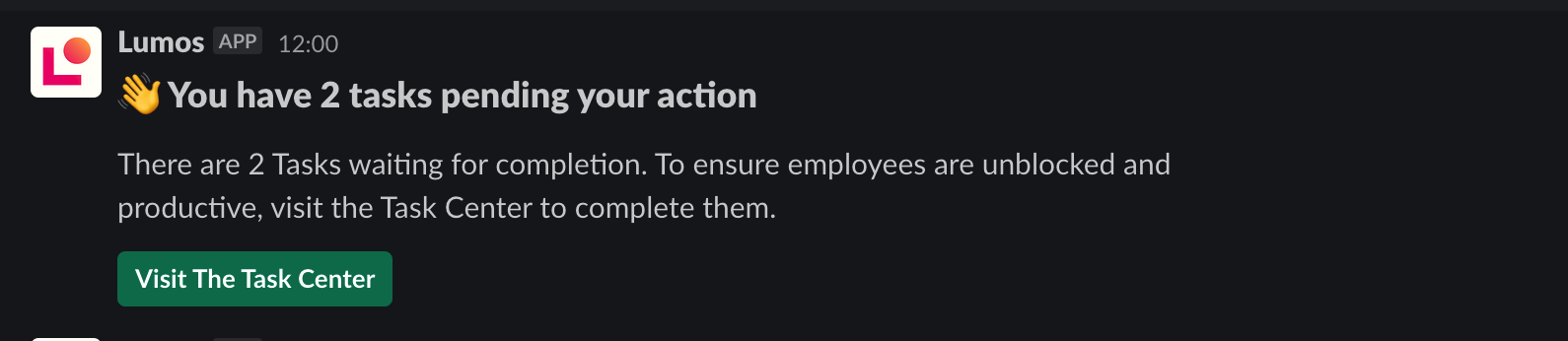 You can set up Task Center reminders for Onboarding and Offboarding tasks in your [Notification Settings.](https://app.lumosidentity.com/settings/notifications)
 ## AppStore reminder settings
If you want Lumos to deliver more frequent notifications for AppStore tasks (**approvals** and **provisioning** tasks), you can set up more frequent reminders in your [notification settings](https://app.lumosidentity.com/settings/notifications). *See*[Approving Access Requests](/kb/quick_start_guide/appstore-1/appstore_explainers_for_new_employees_new_to_appstore/approving-access-requests) *and*[Confirming Provisioning For Access Requests](/kb/quick_start_guide/appstore-1/appstore_explainers_for_new_employees_new_to_appstore/confirming-provisioning-for-access-requests)
## AppStore reminder settings
If you want Lumos to deliver more frequent notifications for AppStore tasks (**approvals** and **provisioning** tasks), you can set up more frequent reminders in your [notification settings](https://app.lumosidentity.com/settings/notifications). *See*[Approving Access Requests](/kb/quick_start_guide/appstore-1/appstore_explainers_for_new_employees_new_to_appstore/approving-access-requests) *and*[Confirming Provisioning For Access Requests](/kb/quick_start_guide/appstore-1/appstore_explainers_for_new_employees_new_to_appstore/confirming-provisioning-for-access-requests)
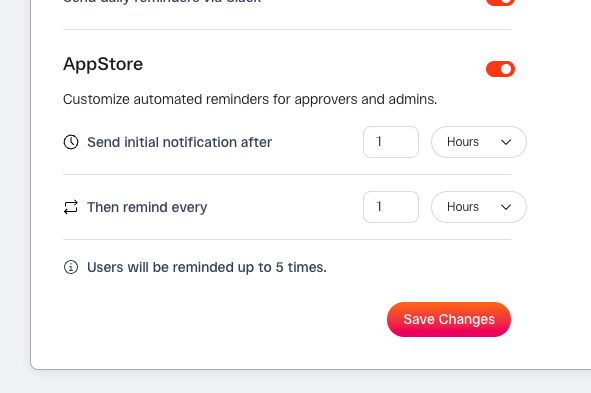 A short description of each setting is below.
* **Send initial notification after** - Determines when Lumos sends the first reminder of an incomplete task.
* **Then remind every** - Determines how often Lumos will remind the approver/admin of their incomplete task.
Lumos will remind an approver or admin **up to 5 times** before falling back to daily reminders, so space out your notifications appropriately.
A short description of each setting is below.
* **Send initial notification after** - Determines when Lumos sends the first reminder of an incomplete task.
* **Then remind every** - Determines how often Lumos will remind the approver/admin of their incomplete task.
Lumos will remind an approver or admin **up to 5 times** before falling back to daily reminders, so space out your notifications appropriately.