> ## Documentation Index
> Fetch the complete documentation index at: https://docs.lumos.com/llms.txt
> Use this file to discover all available pages before exploring further.
# AppStore Activity Log
## After this article
You'll understand how to use the Lumos Activity Log to report on AppStore tasks.
## Background
Auditors may ask you to prove that AppStore requests have the right approvals in place. The Activity Log records who approved each request and when.
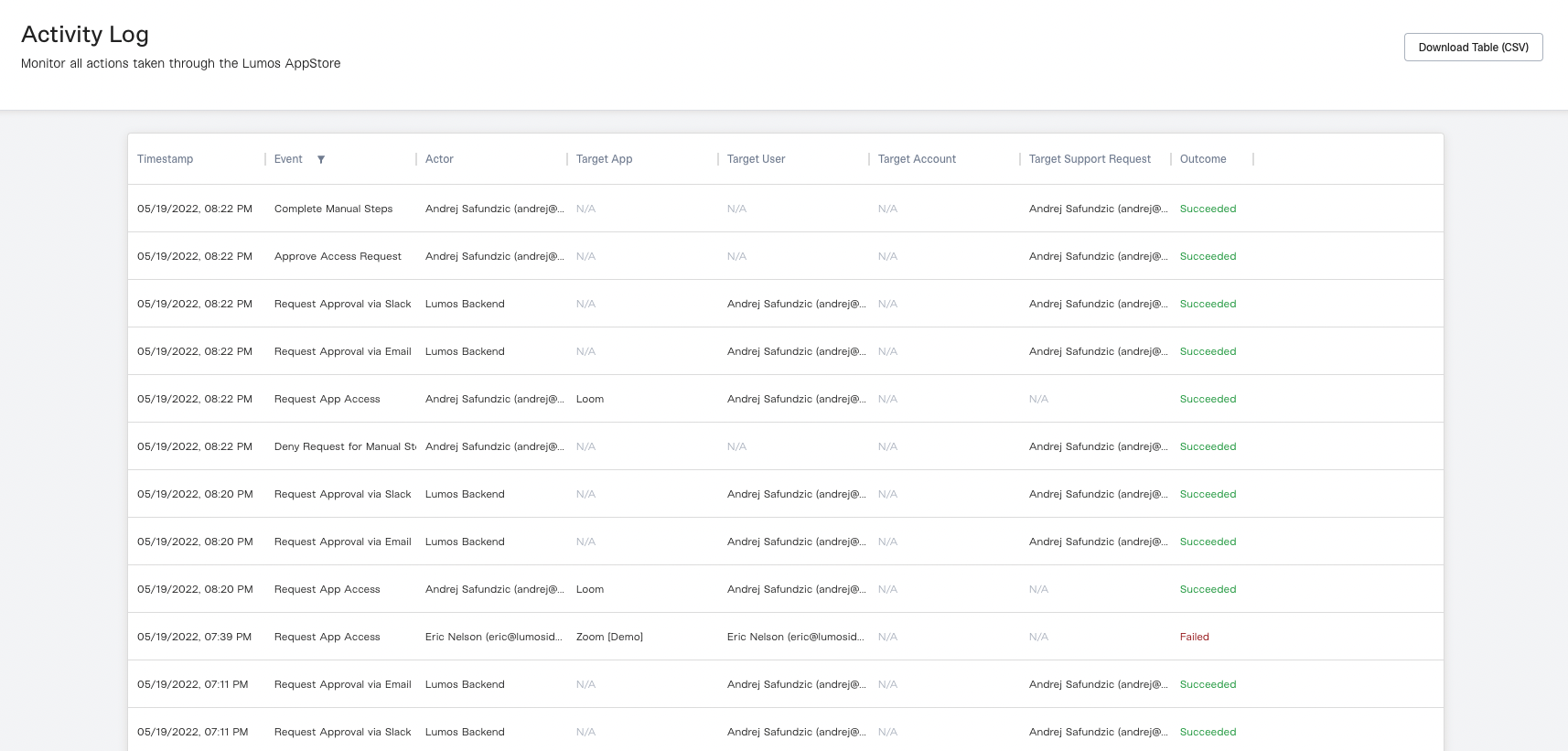 ## Finding the Activity Log
Lumos admins can find the [Activity Log](https://app.lumosidentity.com/activity_log) in the sidebar of the AdminView.
## Downloading The Activity Log
To export the Activity Log to a CSV file, click the "Download Table (CSV)" button in the upper right corner of the Activity Log page.
## Activity Log Events
Below is a breakdown of the different events in the Activity Log and what they mean.
| **Event Type** | **Description** |
| - | - |
| Approve Access Request | An approval of an access request by the **Actor**. |
| Complete Manual Steps | Confirmation that account provisioning has been completed for an app by the **Actor**. |
| Deny Access Request | A denial of an access request by the **Actor**. |
| Deny Request For Manual Steps | A denial of a request to provision an account by the **Actor**. |
| Request App Access | An app request submitted by the **Actor**. |
| Request Approval via Slack | Confirmation that a message has been delivered by Lumos via Slack to approve an access request made by the **Target User**. |
| Request Approval via Email | Confirmation that a message has been delivered by Lumos via email to approve an access request made by the **Target User**. |
## Finding the Activity Log
Lumos admins can find the [Activity Log](https://app.lumosidentity.com/activity_log) in the sidebar of the AdminView.
## Downloading The Activity Log
To export the Activity Log to a CSV file, click the "Download Table (CSV)" button in the upper right corner of the Activity Log page.
## Activity Log Events
Below is a breakdown of the different events in the Activity Log and what they mean.
| **Event Type** | **Description** |
| - | - |
| Approve Access Request | An approval of an access request by the **Actor**. |
| Complete Manual Steps | Confirmation that account provisioning has been completed for an app by the **Actor**. |
| Deny Access Request | A denial of an access request by the **Actor**. |
| Deny Request For Manual Steps | A denial of a request to provision an account by the **Actor**. |
| Request App Access | An app request submitted by the **Actor**. |
| Request Approval via Slack | Confirmation that a message has been delivered by Lumos via Slack to approve an access request made by the **Target User**. |
| Request Approval via Email | Confirmation that a message has been delivered by Lumos via email to approve an access request made by the **Target User**. |