> ## Documentation Index
> Fetch the complete documentation index at: https://docs.lumos.com/llms.txt
> Use this file to discover all available pages before exploring further.
# How-To: Enable Task Summaries for Employee Lifecycle
## Background
Task summaries reduce the number of notifications Lumos sends for onboarding and offboarding tasks. This article shows you how to enable task summaries by product flow.
## How does Lumos "Quiet" my Notifications?
When enabled, Lumos will stop sending one notification for each manual task related to Onboarding or Offboarding. Instead, Lumos will send one notification every \~5 minutes to update you on how many more tasks have come in.
You will then be routed to the Web UI to address all the tasks pertaining to Onboarding/Offboarding.
## Steps to Enable
### 1. Go to [Notification settings](https://app.lumosidentity.com/settings/notifications)
Navigate to Notifications and you should see an option to Enable Task Summaries. Within, you'll see two options, Onboarding and Offboarding.
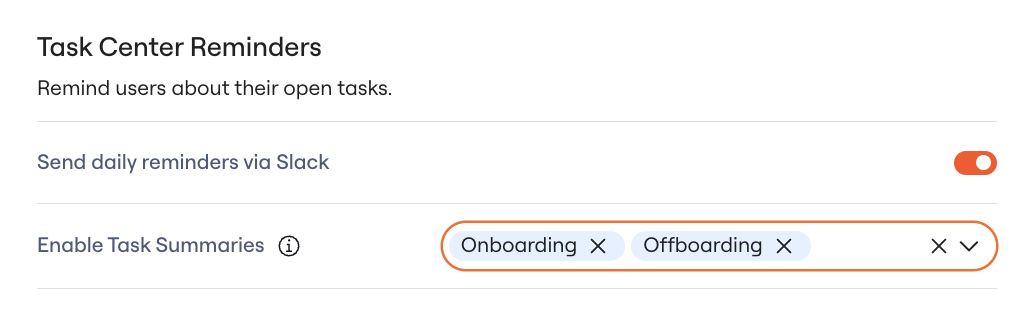 ### 2. Scroll down to the bottom of the page and click "Save Changes".
### 3. Setup complete
## FAQs
#### Will this summarize *all* notifications for my On- and/or Offboardings?
No. Error notifications are excluded from task summaries so that admins see them in real time.
For new hires, Lumos still sends a notification for each app that was provisioned so that new hires can see what they were provisioned to.
#### Can I customize the window before Lumos starts to quiet my On- and/or Offboarding notifications?
At this time, this window is not configurable.
#### Is this supported for other product areas?
Not at this time. To request this functionality for other types of workflows in Lumos, contact your CSM or [support@lumos.com](mailto:support@lumos.com).
### 2. Scroll down to the bottom of the page and click "Save Changes".
### 3. Setup complete
## FAQs
#### Will this summarize *all* notifications for my On- and/or Offboardings?
No. Error notifications are excluded from task summaries so that admins see them in real time.
For new hires, Lumos still sends a notification for each app that was provisioned so that new hires can see what they were provisioned to.
#### Can I customize the window before Lumos starts to quiet my On- and/or Offboarding notifications?
At this time, this window is not configurable.
#### Is this supported for other product areas?
Not at this time. To request this functionality for other types of workflows in Lumos, contact your CSM or [support@lumos.com](mailto:support@lumos.com).