> ## Documentation Index
> Fetch the complete documentation index at: https://docs.lumos.com/llms.txt
> Use this file to discover all available pages before exploring further.
# Enabling Custom Requests
> Enable Custom Requests so employees can request apps not yet in your AppStore, routing them to a chosen ITSM project with optional custom instructions.
## Background
Custom Requests let employees request apps that aren't in your AppStore yet, so you can roll out the AppStore before you've added every approved app.
**Custom Requests** give your employees a way to request *any* app from the Lumos AppStore, even if the app isn't in your AppStore yet. *See[Requesting Access to an App](/for-employees/for-your-workforce/requesting-access-to-an-app)*
This makes the AppStore the entry point for *all* of your access requests.
## Steps
### 1. Enable ITSM.
*See[Connecting Your ITSM](/for-admins/appstore/connecting-your-itsm)*
### 2. Find the "Sync Custom Requests" tab in your [ITSM settings](https://app.lumosidentity.com/settings/itsm).
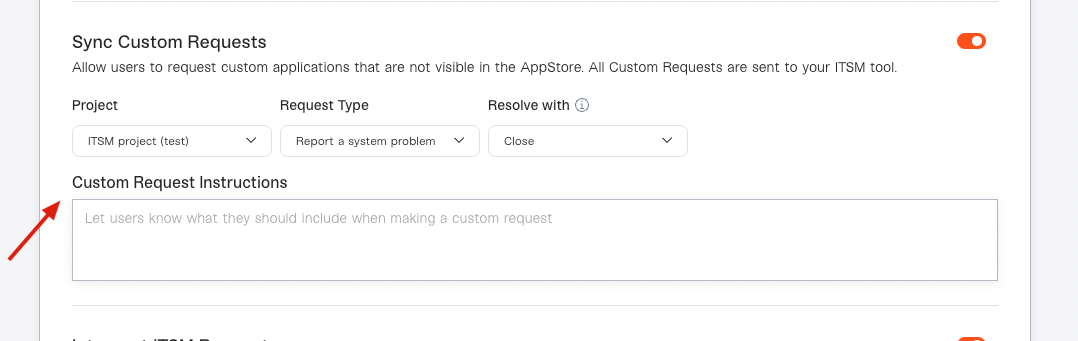
 ### 3. Flip the toggle to the right, then choose where you want them to go in your ITSM.
Specify the *Project*, *Request Type*, and *Resolve with* transition to finish the configuration.
Since Custom Requests will require someone from your team to take action in your ITSM, make sure you specify a destination that's being actively monitored.
### 4. (Optional) Set Custom Instructions
If you want to ask requesters for additional info before they submit a custom request, or set expectations on how you'll be following up with them, you can add instructions.
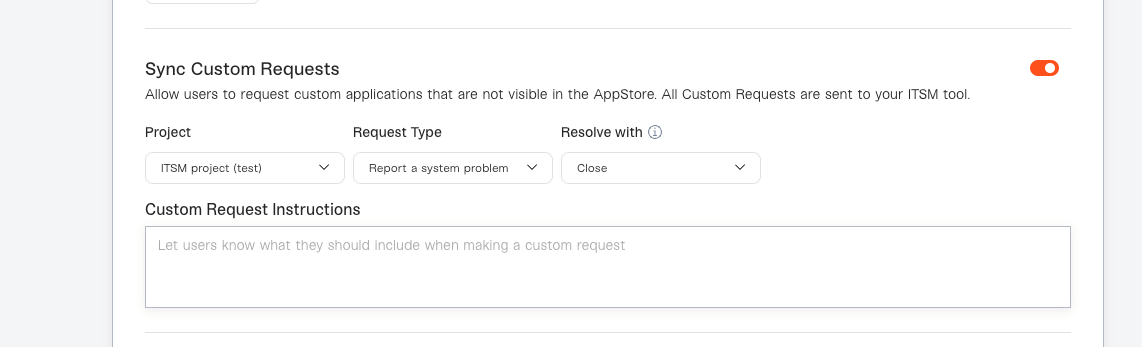
### 3. Flip the toggle to the right, then choose where you want them to go in your ITSM.
Specify the *Project*, *Request Type*, and *Resolve with* transition to finish the configuration.
Since Custom Requests will require someone from your team to take action in your ITSM, make sure you specify a destination that's being actively monitored.
### 4. (Optional) Set Custom Instructions
If you want to ask requesters for additional info before they submit a custom request, or set expectations on how you'll be following up with them, you can add instructions.