> ## Documentation Index
> Fetch the complete documentation index at: https://docs.lumos.com/llms.txt
> Use this file to discover all available pages before exploring further.
# Object Model
Understanding the Lumos object model
The Lumos object model centers around Identities (people) that have Accounts across systems, with Permissions (permissions, roles, licenses) assigned to those Accounts within specific Resources (workspaces, projects), all organized within Teams that reflect the organizational structure.
**Organizational Structure:**
**Identity\
↳ Title\
↳ Team\
↳ Manager**
**Permissions Structure:**
**Identity → Accounts → Permissions → Resources**
This guide provides an overview of the Lumos object model and explains how to effectively model permissions within the system. Understanding these concepts is crucial for architects and administrators implementing Lumos as their identity solution.
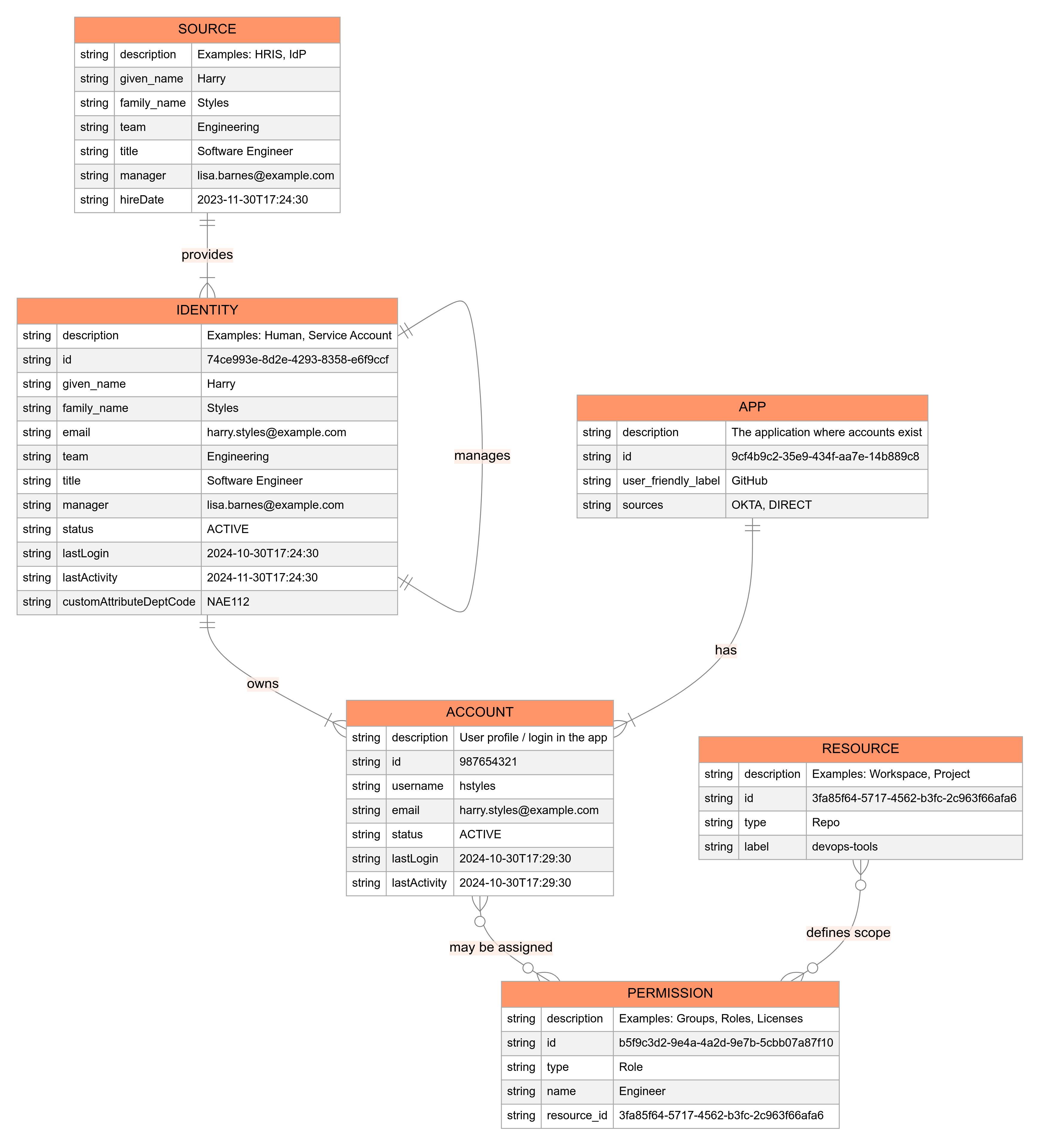
Below is a conceptual model for how Lumos structures identity and permissions data. Use this model to design how permissions should be represented in your own organization and how data flows in and out of Lumos.
 **Identity**
The Identity object represents the core entity in Lumos – a person within your organization. Identities are typically sourced from authoritative systems such as:
* Human Resource Information Systems (HRIS, e.g., Workday, UKG, ADP, BambooHR, etc.)
* Identity Providers (IdP, e.g., Okta, Microsoft Entra ID, OneLogin, etc.)
* Directories (e.g., Active Directory, OpenLDAP)
* Custom HR Systems
Each Identity contains fundamental attributes:
* Unique identifier
* Basic profile information (name, email, etc.)
* Employment details (hire date, termination date)
* Organizational context (team, title)
* Reporting relationships (manager)
* Account status (active, inactive, suspended)
* Last Login
**Account**
Accounts represent user access within specific applications or systems. Key characteristics include:
* An Identity can have multiple Accounts across different systems
* Accounts are linked to their parent Identity
* Each Account contains system-specific attributes
* Account status (active, inactive, suspended)
* Last Login and Last activity
* Associated with one Identity, but can exist in multiple apps.
**Permission**
* A permission, role, license, or group that can be assigned/unassigned to an account.
* *Examples*: Slack “channel membership,” O365 “license: E3,” GitHub “org role: admin.”
* Typically discovered by Lumos using list\_entitlements.
**Resource**
* Contextual grouping or container. For example, in Slack, a resource might be a specific workspace. In AWS, a resource might be an AWS account or a region.
* list\_resources enumerates these.
**Relationships**
* **Identity → Account**: A single identity can have multiple accounts across different systems.
* **Account → Permissions**: A single account can have multiple permissions.
* **Resource → Permissions**: Some permissions belong to a specific resource context (e.g., a role within a specific AWS account).
**Identity**
The Identity object represents the core entity in Lumos – a person within your organization. Identities are typically sourced from authoritative systems such as:
* Human Resource Information Systems (HRIS, e.g., Workday, UKG, ADP, BambooHR, etc.)
* Identity Providers (IdP, e.g., Okta, Microsoft Entra ID, OneLogin, etc.)
* Directories (e.g., Active Directory, OpenLDAP)
* Custom HR Systems
Each Identity contains fundamental attributes:
* Unique identifier
* Basic profile information (name, email, etc.)
* Employment details (hire date, termination date)
* Organizational context (team, title)
* Reporting relationships (manager)
* Account status (active, inactive, suspended)
* Last Login
**Account**
Accounts represent user access within specific applications or systems. Key characteristics include:
* An Identity can have multiple Accounts across different systems
* Accounts are linked to their parent Identity
* Each Account contains system-specific attributes
* Account status (active, inactive, suspended)
* Last Login and Last activity
* Associated with one Identity, but can exist in multiple apps.
**Permission**
* A permission, role, license, or group that can be assigned/unassigned to an account.
* *Examples*: Slack “channel membership,” O365 “license: E3,” GitHub “org role: admin.”
* Typically discovered by Lumos using list\_entitlements.
**Resource**
* Contextual grouping or container. For example, in Slack, a resource might be a specific workspace. In AWS, a resource might be an AWS account or a region.
* list\_resources enumerates these.
**Relationships**
* **Identity → Account**: A single identity can have multiple accounts across different systems.
* **Account → Permissions**: A single account can have multiple permissions.
* **Resource → Permissions**: Some permissions belong to a specific resource context (e.g., a role within a specific AWS account).